Table of Contents >> Show >> Hide
- Quick refresher: what binary actually means
- Way #1: Repeated Division by 2 (the classic method)
- Way #2: Powers of Two (place values / subtraction method)
- Way #3: Programmer Method (bitwise thinking + built-in conversions)
- Common pitfalls (and how to avoid them)
- Which method should you use?
- Real-world experiences and “oh wow” moments
- Conclusion
Converting a decimal number (base-10) to binary (base-2) is one of those skills that feels like magic
the first time it clicks. Then you realize it’s not magicit’s just organized laziness: you’re letting
patterns do the heavy lifting while you sip your coffee like a responsible adult who definitely didn’t
learn this five minutes ago.
In this guide, you’ll learn three practical methods to convert decimal to binary:
the classic divide-by-2 approach, the powers-of-two method (a.k.a. “binary bingo”),
and a programmer-friendly approach using bit logic and built-in tools. You’ll also get
step-by-step examples, quick checks, and the most common mistakes (so you can avoid them and look
suspiciously competent).
Quick refresher: what binary actually means
Decimal is base-10, so each place value represents a power of 10 (ones, tens, hundreds, etc.).
Binary is base-2, so each place value represents a power of 2:
1, 2, 4, 8, 16, 32, 64, 128…
A binary number is just a set of switches: each bit is either 0 (off) or 1 (on).
When a bit is on, you “include” that power of 2. When it’s off, you don’t.
Way #1: Repeated Division by 2 (the classic method)
This is the most widely taught method because it works reliably for any nonnegative integer and
gives you the binary digits in a predictable way.
How it works
- Divide the decimal number by 2.
- Write down the remainder (it will be 0 or 1).
- Replace the number with the quotient (ignore the remainder now).
- Repeat until the quotient becomes 0.
- Read the remainders from bottom to top (reverse order).
The only “gotcha” is the last step: you must reverse the remainders.
If you read them top to bottom, you get a sad little lie instead of the truth.
Example: Convert 156 to binary
We’ll divide by 2 repeatedly and track quotient + remainder:
| Step | Number ÷ 2 | Quotient | Remainder |
|---|---|---|---|
| 1 | 156 ÷ 2 | 78 | 0 |
| 2 | 78 ÷ 2 | 39 | 0 |
| 3 | 39 ÷ 2 | 19 | 1 |
| 4 | 19 ÷ 2 | 9 | 1 |
| 5 | 9 ÷ 2 | 4 | 1 |
| 6 | 4 ÷ 2 | 2 | 0 |
| 7 | 2 ÷ 2 | 1 | 0 |
| 8 | 1 ÷ 2 | 0 | 1 |
Now read the remainders from bottom to top:
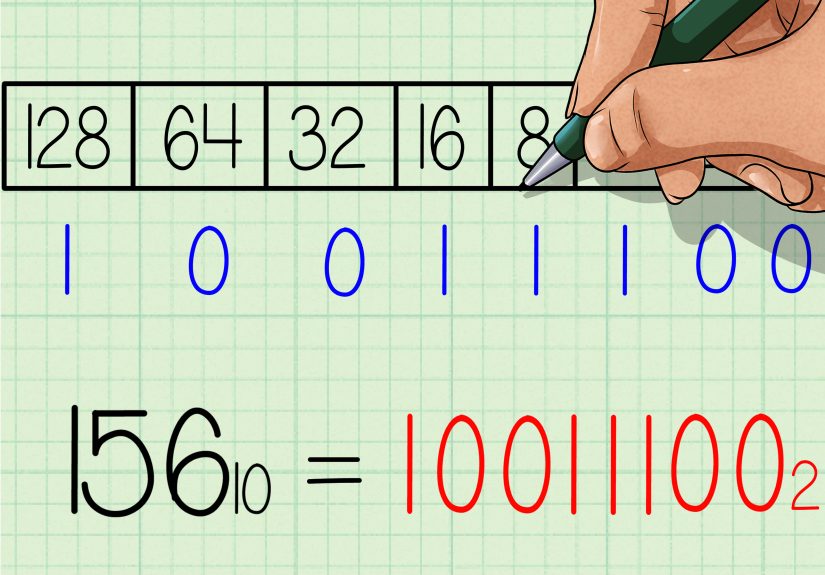
1 0 0 1 1 1 0 0
So, 15610 = 100111002.
Fast sanity check
Convert back to decimal by adding the “on” powers of 2:
- 100111002 = 1·128 + 0·64 + 0·32 + 1·16 + 1·8 + 1·4 + 0·2 + 0·1
- = 128 + 16 + 8 + 4 = 156
If your check works, congratulationsyou’re officially allowed to smugly nod at your own math.
Way #2: Powers of Two (place values / subtraction method)
This method is perfect when you want to see binary as place values instead of a division process.
It’s also great for mental math once you get comfortable with powers of 2.
How it works
- Find the largest power of 2 that is ≤ your number.
- Write a 1 in that bit position.
- Subtract that power of 2 from your number.
- Repeat with the remainder for the next lower powers of 2.
- Write 0 for any power of 2 you skip.
Think of it like packing a suitcase: you grab the biggest item that fits, toss it in, and keep going
until your suitcase (the number) is empty.
Example: Convert 89 to binary
Start with the powers of two around 89:
64, 32, 16, 8, 4, 2, 1.
- 89 − 64 = 25 → bit for 64 is 1
- 25 − 32 (can’t) → bit for 32 is 0
- 25 − 16 = 9 → bit for 16 is 1
- 9 − 8 = 1 → bit for 8 is 1
- 1 − 4 (can’t) → bit for 4 is 0
- 1 − 2 (can’t) → bit for 2 is 0
- 1 − 1 = 0 → bit for 1 is 1
Now write the bits from 64 down to 1:
1 0 1 1 0 0 1
So, 8910 = 10110012.
Why this method is secretly awesome
- It builds intuition for binary representation (you literally see which powers of two are “on”).
- It helps with computer topics like bit masks, flags, and why 255 is 11111111 in 8-bit land.
- It makes verifying results easy: just add the selected powers of two.
Way #3: Programmer Method (bitwise thinking + built-in conversions)
If you’re converting decimal to binary because you write code (or you’re about to be interviewed by
someone who thinks whiteboards are a personality), this method is your best friend.
Option A: Build binary using remainders (like Way #1, but in code)
Under the hood, the divide-by-2 method is basically:
take n % 2 to get the last bit, then do n = floor(n / 2).
Notice the trick: we’re prepending each remainder to the front of the string so we don’t
have to reverse at the end. (Prepending can be slow in some languages, but the idea is clear.)
Option B: Use bit shifting (very “computer-science-y”)
Bit shifting is like dividing by 2, but with more swagger:
n >> 1 shifts bits right by one place, which is equivalent to integer division by 2.
Meanwhile, n & 1 extracts the last bit.
This method mirrors how machines naturally manipulate binary data. It’s also a gateway to understanding
masks, permissions, toggles, and why programmers love powers of two like they’re collectible cards.
Option C: Built-in conversion tools (when you want results, not drama)
Many languages include a built-in way to convert a number to a base-2 string. Examples:
- Python:
bin(n)(returns a string like0b1010) - JavaScript:
n.toString(2) - Java:
Integer.toBinaryString(n) - C#:
Convert.ToString(n, 2)
These are excellent for real applications. But it’s still worth learning the manual methods so you
understand what the tools are doingand so you don’t panic if an interviewer takes your computer away
and hands you a marker that smells like old sadness.
Common pitfalls (and how to avoid them)
1) Forgetting to reverse remainders
In the divide-by-2 method, the first remainder you get is the least significant bit.
If you read top-to-bottom, you’re reading the binary backward.
2) Leading zeros confusion
Leading zeros don’t change a value (just like 007 is still 7), but computers often use a fixed bit-width
(8-bit, 16-bit, 32-bit). So 5 might appear as 00000101 in an 8-bit system.
3) Negative numbers
Binary for negative integers in most systems uses two’s complement. That’s a whole topic by itself,
but the short version is: the representation depends on how many bits you’re using (8-bit vs 32-bit, etc.).
So there isn’t a single “one-size-fits-all” binary string for a negative number unless you specify the bit width.
4) Fractions (the bonus level)
If you ever need to convert something like 12.375 to binary, you typically convert the integer part using one of
the three ways above, then convert the fractional part by repeatedly multiplying by 2 and tracking carry bits.
Fractions can become repeating in binary (just like 1/3 repeats in decimal), so you often approximate to a fixed number
of bits.
Which method should you use?
- Use Way #1 (divide by 2) when you want a dependable step-by-step process for any integer.
- Use Way #2 (powers of two) when you want intuition, mental math, or a quick “does this make sense?” check.
- Use Way #3 (programmer method) when you’re coding, debugging, working with bitwise operations, or prepping for interviews.
The best part: once you know one method, the others start to feel like different camera angles on the same scene.
You’re not learning three separate tricksyou’re learning three ways to understand the same idea.
Real-world experiences and “oh wow” moments
If you spend any time around programming, networking, electronics, or even just “that one friend who builds keyboards
for sport,” decimal-to-binary conversion shows up in surprisingly human ways. Not just as a homework exercise, but as
a recurring little story you keep bumping intolike a cameo appearance by the same actor in every movie.
One common experience is the first time you see an IP address and realize it’s basically binary wearing a decimal trench coat.
In IPv4, each octet (like the “192” in 192.168.0.1) maps to 8 bits. People often remember the day they finally connect the dots:
“Wait… 255 is 11111111?” And suddenly subnet masks stop being mystical runes and start being arithmetic with a costume change.
Even if you never become a networking wizard, that momentwatching the lights turn onis a classic.
Another experience: debugging a “why is this flag set?” problem. Many systems store multiple yes/no settings in a single integer.
You might have permission bits, feature toggles, or status codes where one number secretly contains many meanings. The first time you
convert a decimal like 13 to binary (1101) and notice it’s really “8 + 4 + 1,” you start seeing integers less as single values and more as
compact containers. That mental shift is huge. Suddenly, bit masks aren’t “advanced” so much as “organized on/off switches.”
Then there’s the interview scenario. You’ll sometimes be asked to convert a number without a calculator to test whether you actually
understand bases. People tend to freeze not because the math is hard, but because they feel like there’s one correct ritual and if they
don’t remember it perfectly, they’re doomed. That’s where knowing all three methods helps. If division feels slow, you can switch to powers
of two. If powers of two feel slippery, you can do repeated division and just be careful about the remainders. Having multiple routes lowers
stressand stress is usually the real enemy, not base conversion.
A very relatable moment happens when someone first learns to “read” binary patterns quickly. At first, 10011100 looks like a random barcode.
But after a bit of practice, you see landmarks: the leftmost 1 tells you the biggest power of two, and the rest are just add-ons.
With time, you begin to estimate values almost instantly. It’s like learning to read music: initially, every note is a separate puzzle; later,
you recognize shapes.
People also experience the “fraction trap.” They try converting something like 0.1 to binary and expect it to end neatly the way 0.125 does.
But some fractions repeat forever in binary, which is a big reason floating-point numbers can have rounding issues in real software.
Once you see that behavior with your own eyes, you stop being shocked when 0.1 + 0.2 isn’t exactly 0.3 in many languages. The conversion
methods become more than a trickthey become a window into how computers approximate reality.
Finally, there’s the strangely satisfying experience of being able to “undo” your conversion on the spot. You convert decimal to binary,
then immediately verify by summing powers of two. That feedback loop builds confidence fast. It’s not about memorizing; it’s about being able
to check yourself. And in any technical field, the ability to verify is basically a superpowerbecause it turns confusion into a process.
In short: learning decimal-to-binary conversion isn’t just learning how to write numbers differently. It changes how you interpret what a number
can represent. It’s one of those foundational skills that keeps paying rent in your brain long after the quiz is over.
Conclusion
Converting from decimal to binary doesn’t require special talentjust a method that matches your brain.
Use division when you want a reliable recipe, powers of two when you want intuition, and bitwise/built-in approaches
when you want speed in real code. Learn one well, keep the others in your back pocket, and you’ll be able to translate
between base-10 and base-2 without breaking a sweat (or at least without breaking too much sweat).