Table of Contents >> Show >> Hide
- What Makes an Icon Theme “One of the Best”?
- How to Install Icon Themes on Linux (Without Making It Weird)
- The 6 Best Icon Themes for Linux
- 1) Papirus: The “Just Works” Favorite
- 2) Tela: Flat, Colorful, and Surprisingly Grown-Up
- 3) Numix Circle: The Bold “All Apps Belong in a Badge” Look
- 4) WhiteSur: macOS-Inspired, Clean, and HiDPI-Friendly
- 5) Flat Remix: Modern Flat Design with Just Enough Depth
- 6) La Capitaine: Gradient-Polished Icons for a Premium Feel
- How to Pick the Right Theme for Your Desktop
- Troubleshooting: When Icons Don’t Change (Yes, This Happens)
- Conclusion: A Small Change That Makes Linux Feel New Again
- Experiences: What It’s Like to Actually Live With These Icon Themes (Extra Notes)
Linux has a superpower other operating systems only pretend to have: you can make your desktop look exactly how you want,
down to the tiny little folder icons that silently judge your file organization habits. If you’ve ever opened your app menu
and thought, “These icons look like they were designed during the dial-up era,” you’re in the right place.
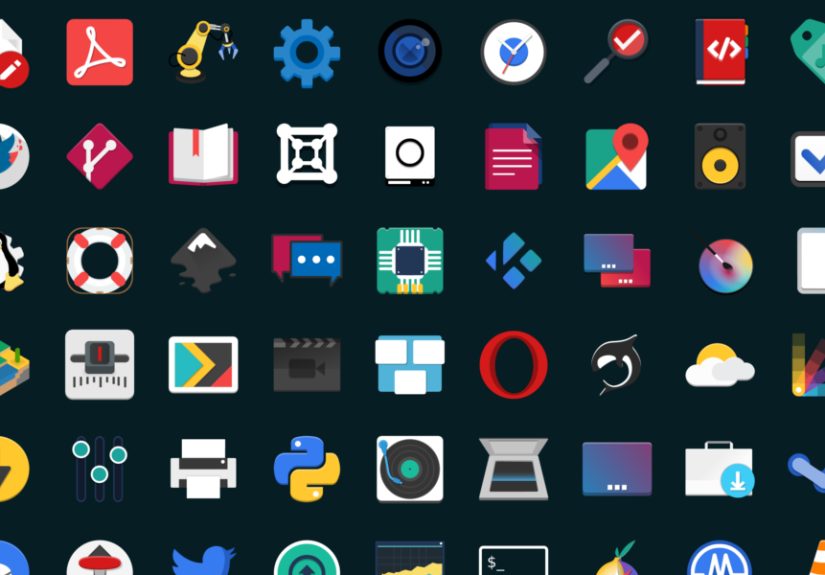
In this guide, we’ll cover six of the best icon themes for Linux (aka Linux icon packs) that look great across popular desktop
environments like GNOME, KDE Plasma, Cinnamon, XFCE, and more. You’ll also learn what makes a theme “good,” how to install icon
themes on Linux without summoning chaos, and how to avoid the classic “why does this one app still have the default icon?” spiral.
What Makes an Icon Theme “One of the Best”?
“Best” is subjectivelike pizza toppings, keyboard layouts, or whether tabs are morally superior to spaces. Still, the best Linux
icon themes tend to share a few practical traits:
- Coverage: Lots of app icons and MIME types (file icons), so your desktop stays consistent.
- Consistency: A coherent style across apps, folders, system icons, and panels.
- Scalability: Vector (SVG) icons look crisp at different sizes and on HiDPI displays.
- Desktop compatibility: Works well on GTK-based desktops (GNOME, XFCE, Cinnamon) and often KDE Plasma too.
- Active maintenance: The theme gets updates as apps and icon naming conventions evolve.
Bonus points if the theme includes variants (light/dark, different folder colors, or bold versions for high-resolution screens),
because sometimes you want “professional,” and sometimes you want “my computer is a candy store.”
How to Install Icon Themes on Linux (Without Making It Weird)
Installing a Linux icon theme usually comes down to two steps: (1) put the theme folder in the right place, and (2) select it in
your desktop’s appearance settings.
Step 1: Install from your distro (easiest)
Many popular icon themes are available in distribution repositories. If your theme exists there, this is the cleanest route because
updates arrive like normal system updates.
Step 2: Manual install (works everywhere)
If you download a theme as a ZIP/TAR archive (or clone it), move the extracted theme folder into one of these locations:
- Per-user:
~/.iconsor~/.local/share/icons - System-wide:
/usr/share/icons(requires admin permissions)
After copying the folder, log out and back in if your settings tool doesn’t immediately show it. Some desktops also benefit from
rebuilding icon caches.
Step 3: Select the theme (GNOME, KDE, XFCE)
- GNOME: Use GNOME Tweaks → Appearance → Icons.
- KDE Plasma: System Settings → Appearance → Icons.
- XFCE: Settings Manager → Appearance → Icons.
If a few icons refuse to change, it’s usually because that app is using a hardcoded icon path or a nonstandard icon name. Don’t panic
it’s not you. It’s… okay, sometimes it’s the app.
The 6 Best Icon Themes for Linux
Here are six standout icon themes that consistently show up in “best of” lists and real-world Linux setups. Each has a distinct style,
solid coverage, and a track record of making desktops look modern instead of “mystery meat UI.”
1) Papirus: The “Just Works” Favorite
Papirus is one of the most widely used icon themes in the Linux world, and for good reason: it balances clean shapes with friendly color,
and it covers an impressive number of applications. The overall vibe is modern, slightly “material-inspired,” and tidy enough to look
professional without feeling sterile.
Why people love it:
- Excellent app coverage and consistent styling across the desktop
- Works well on GNOME, KDE Plasma, XFCE, Cinnamon, and more
- Often includes multiple variants (like light/dark)
If you want a theme that feels cohesive across system icons, file icons, and common apps, Papirus is the safest “great choice” you can make.
It’s the jeans-and-a-nice-shirt of Linux customization: you’re never underdressed.
2) Tela: Flat, Colorful, and Surprisingly Grown-Up
Tela is a flat, colorful icon theme that manages to look playful without turning your desktop into a toy box. The icons are crisp, well-shaped,
and designed to feel modern across different desktop environments. If you enjoy bold color but still want things to feel “designed,” Tela hits
the sweet spot.
Why it stands out:
- Bright, clean icons that remain readable at small sizes
- Good consistency across app icons and desktop elements
- Pairs nicely with both light and dark GTK themes
Tela is a great pick if your current icons feel dull, but you don’t want to go full neon. Think “fresh paint,” not “laser show.”
3) Numix Circle: The Bold “All Apps Belong in a Badge” Look
Numix Circle is famous for a specific aesthetic: circular app icons with vivid backgrounds. That single design rule can make your app menu look
incredibly uniformand it also means any icon that doesn’t conform will stand out like a penguin in a flamingo parade.
Why people choose it:
- Highly recognizable “circle” branding across your launcher
- Colorful, energetic look that makes icons easy to scan
- Popular enough that many distributions and communities support it
If you love a strong visual identity and want your app grid to look curated, Numix Circle is a fun (and surprisingly functional) option.
4) WhiteSur: macOS-Inspired, Clean, and HiDPI-Friendly
Want a desktop that whispers “sleek”? WhiteSur is designed to evoke a macOS-like icon stylepolished, glossy in just the right way, and very
“designed.” It’s especially popular with users who pair it with matching GTK/KDE themes for a unified look.
Why it’s a top pick:
- Striking, modern icons that look great in docks and launchers
- Often includes options suited for high-resolution displays
- Pairs well with macOS-like desktop layouts and themes
WhiteSur is for people who want their Linux desktop to look like it has an interior designer. The kind who says “no, that shadow is 2px too dramatic.”
5) Flat Remix: Modern Flat Design with Just Enough Depth
Flat Remix takes inspiration from modern flat design, but it avoids the common “flat means lifeless” trap. While the overall look is clean and minimal,
it still uses subtle depth cues (like gentle gradients or highlights) to keep icons readable and visually interesting.
Why it works so well:
- Clean, contemporary style that fits many desktop themes
- Readable icons that stay clear at different sizes
- A balanced aesthetic: not too loud, not too plain
If you want a theme that looks current without calling attention to itself every time you open a folder, Flat Remix is a strong everyday driver.
6) La Capitaine: Gradient-Polished Icons for a Premium Feel
La Capitaine blends macOS-style polish with modern design influencesthink pleasing gradients, subtle shadows, and simple, confident geometry. It’s an icon pack that
can make a desktop feel “premium,” especially if you like a bit of visual richness compared to strictly flat sets.
Why it deserves a spot:
- Beautiful gradients and shading that still feel tasteful
- Designed to integrate with many desktop environments
- Scalable icons that look sharp across UI sizes
La Capitaine is great when you want your system to feel a little more “crafted.” The icons look like they had a meeting, drafted a plan, and then executed it.
How to Pick the Right Theme for Your Desktop
If you’re stuck deciding, here’s an easy way to match a theme to your “desktop personality”:
- Maximum compatibility + everyday polish: Papirus
- Colorful but clean: Tela or Flat Remix
- Bold, unified launcher look: Numix Circle
- macOS-inspired aesthetic: WhiteSur
- Premium gradients + artistic flair: La Capitaine
Also: consider your desktop environment. KDE Plasma users often care about how icons appear in system settings, file managers, and panels. GNOME users
may prioritize how icons look in the app grid and dock. XFCE users might value clarity at smaller sizes on lightweight setups. Same themedifferent priorities.
Troubleshooting: When Icons Don’t Change (Yes, This Happens)
If most icons change but a few refuse, here are the usual suspects:
- Hardcoded icons: Some apps point to a specific file path instead of an icon name.
- Cache issues: Your system may still be reading an old icon cache.
- Flatpak/Snap quirks: Sandboxed apps sometimes need extra theme access to match the system.
- Missing icon names: An app may use an icon name the theme doesn’t provide.
Practical fixes:
- Log out and back in (fast, boring, effective).
- Try switching to another icon theme and back again (it can force refresh).
- Make sure the theme folder is named correctly and contains an
index.themefile. - For stubborn apps, check whether they’re using a nonstandard icon name and consider adding a symlink (advanced but doable).
Conclusion: A Small Change That Makes Linux Feel New Again
Icon themes are one of the quickest ways to refresh your Linux desktop without changing distributions, desktop environments, or your entire workflow.
Whether you want Papirus for reliable coverage, Tela for bright modern design, Numix Circle for bold uniformity, WhiteSur for sleek macOS-inspired polish,
Flat Remix for balanced minimalism, or La Capitaine for premium gradients, you can make your system feel brand-new in under an hour.
The best part? You can try a theme, live with it for a day, and switch again tomorrow. Linux is not a marriage. It’s a buffet.
Experiences: What It’s Like to Actually Live With These Icon Themes (Extra Notes)
Switching icon themes sounds cosmeticand it isbut the experience can be surprisingly practical. The first thing many people notice isn’t “beauty,”
it’s speed: your brain learns the shapes faster than it learns labels. A theme with strong visual consistency makes your app grid and file manager
easier to scan, especially when you’re juggling similar tools (two terminals, a code editor, a note app, and three browsers because you’re “testing”).
With something like Papirus or Flat Remix, icons tend to remain distinct even when they share the same color family, so you spend less time hunting.
Then there’s the “mood effect,” which sounds dramatic until you’ve used a theme for a week. WhiteSur and La Capitaine, for example, can make a desktop
feel calmer and more curated. That can actually influence how you work: you’re more likely to keep your dock tidy and your desktop clean because the visual
style feels intentional. Numix Circle, on the other hand, is a vibe. It makes the launcher feel playful and boldalmost like your system is cheering you on.
But it also has a real-world quirk: one oddball icon that doesn’t match can stand out more than it would in a less uniform theme. Some users love that
because it makes “unthemed” apps obvious; others find it mildly annoying in a “why are you like this?” way.
A common experience across all icon packs is the “last 5% problem.” You install a theme, everything looks great, and then one app stubbornly keeps a default
icon. This is where expectations matter. Themes can’t always override hardcoded icons or apps that don’t follow common naming conventions. The good news is that
the most popular icon themes tend to have better coverage and more community attention, which means missing icons are less frequent and more likely to be added
over time. If you use lots of niche apps, you may prefer a theme known for broad coverage rather than one that prioritizes a specific aesthetic.
Another real-world detail: icon themes can change how “dark mode” feels. A dark GTK theme with overly bright icons can look harsh, while a theme with balanced
highlights feels smoother on the eyes. Tela and Flat Remix tend to pair well with both light and dark setups, while WhiteSur often looks best when you lean into
its matching ecosystem (dock style, window theme, and maybe a wallpaper that says “Yes, I enjoy clean lines”). If you’re on a HiDPI display, themes that emphasize
scalable assets and offer bold or high-resolution-friendly variants can make everything look more crispespecially in docks and file managers.
Finally, icon themes become part of your identity as a Linux user (whether you like it or not). People will see a screenshot and instantly know your aesthetic:
“Oh, that’s Papirus,” or “You’re a WhiteSur person.” It’s harmless, fun, and arguably the most wholesome form of customization obsession. And if you do end up
theme-hoppingwelcome to the club. The first step is acceptance. The second step is downloading “just one more icon pack,” which is exactly what someone says
right before they reorganize their entire desktop at 2 a.m.