Table of Contents >> Show >> Hide
- Why curing matters (and what it’s actually doing)
- What a UV lightbox is (and what separates a good one from a regret)
- Key specs to get right
- DIY vs. commercial: choosing your path without choosing chaos
- A smart DIY UV lightbox setup (without the sketchy parts)
- How to cure prints like you mean it
- Tacky after curing? Troubleshooting the usual suspects
- UV safety: protect your prints and your eyeballs
- Experience Notes: What using a UV lightbox actually feels like (500-ish words)
- Conclusion
Resin prints have a funny way of looking “done” long before they’re actually done. They come off the build plate sharp,
detailed, and suspiciously perfectthen you touch them and realize they’re a little tacky, a little bendy, and a lot like
a gummy bear that went to engineering school.
That’s where a UV lightbox for curing prints earns its keep. Think of it as a controlled “mini sun” that
finishes the chemical job your printer started: it hardens the surface, boosts strength, improves heat resistance, and helps
your prints stay stable over time. Done right, post-curing is the difference between “cool shelf piece” and “usable part.”
Done wrong, it’s how you end up with yellowed minis and brittle brackets that snap like potato chips.
Why curing matters (and what it’s actually doing)
Most resin 3D printing uses photopolymer resinliquid chemistry that solidifies when exposed to light at specific UV-adjacent
wavelengths. Your printer cures each layer enough to hold shape, but that doesn’t always mean the part has reached its best
mechanical properties. Post-curing continues polymerization so parts can become stronger, less tacky, and more dimensionally
stable.
Practical translation: post-curing can turn a flexible, slightly “green” print into something that feels like a finished plastic part.
It can also reduce surface tack and improve performanceespecially for engineering or specialty resins. The key is to cure to a goal
(strength, stability, or surface finish), not to a random timer setting you found in a comment thread at 2 a.m.
What a UV lightbox is (and what separates a good one from a regret)
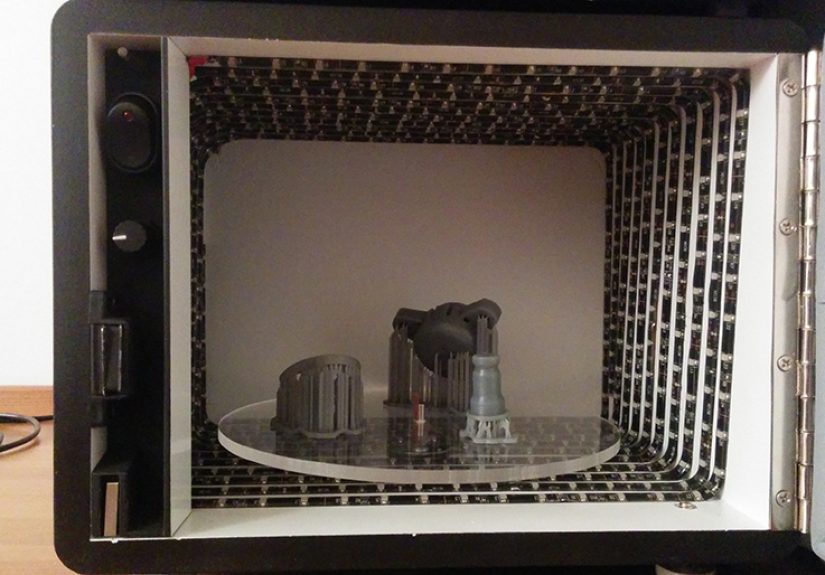
A UV lightbox is an enclosed chamber with UV LEDs (most commonly around 405 nm for MSLA-style resins), reflective or
diffusing interior surfaces, and ideally a turntable so light hits the part evenly. Some commercial units add heat for faster and
more consistent results.
A “good” curing box does three things reliably:
- Delivers the right wavelength for your resin’s photoinitiators (usually 405 nm; sometimes 365 nm or broader).
- Provides even exposure so you don’t get one side glass-hard and the other side still flirting with tackiness.
- Controls risk by keeping UV light where it belongs: inside the box, not in your eyes or on your skin.
A “regret” box is typically a cardboard contraption lined with mirror-like foil, powered by a “mystery UV” bulb, with an open top.
It works right up until the day you realize your eyelids don’t have SPF.
Key specs to get right
1) Wavelength: 405 nm vs. 365 nm (and why “UV” isn’t specific enough)
Many hobby resin printers and consumer curing stations target 405 nm, which matches the common resin systems used by
MSLA printers. Some setups also include 365 nm LEDs, and some specialty resins may respond differently depending on their
formulation. The safest approach is boringbut effective: check your resin manufacturer’s post-cure guidance.
2) Intensity and distance: the “sunburn math” you can’t ignore
UV intensity drops quickly as distance increases. Move a part twice as far from the LEDs and you can dramatically reduce the dose it receives.
That’s why “it cured in 3 minutes for that person” doesn’t guarantee it will cure in 3 minutes for youyour LED power, layout, and part placement
all matter.
Instead of chasing exact minutes, use a repeatable method: set a baseline cycle, inspect, then add small increments. Consistency beats bravado.
3) Uniform exposure: turntables, multi-direction LEDs, and the “shadow problem”
Complex geometry creates shadows. If you cure a miniature with a cape (or a functional part with deep channels), areas hidden from the light can lag behind.
A rotating platform is the easiest fix, and it’s why many curing stations include one. For DIY builds, a small turntable can be a game-changerbecause you
don’t want to “babysit and flip” like you’re grilling kebabs.
4) Heat: when warmth helps (and when it doesn’t)
Some professional curing systems combine heat and UV for speed and repeatability. Heat can help certain resins reach targeted properties faster, but it also
raises the stakes: too much heat can warp thin parts, and curing hot parts unevenly can introduce stress. If you add heat to a DIY box, keep it gentle, controlled,
and consistentthis is curing, not brisket.
DIY vs. commercial: choosing your path without choosing chaos
A commercial wash-and-cure unit is the simplest route: enclosed UV, integrated timer, and predictable layout. It’s also usually more consistent than a DIY build.
DIY shines when you need a larger chamber, want to cure multiple parts at once, or just enjoy building tools as much as you enjoy printing tools.
Here’s a practical decision guide:
- Go commercial if you want reliable results with minimal tinkering, especially for frequent printing.
- Go DIY if you need a bigger chamber, want customization (extra LED coverage, shelves, special mounts), or you’re working on a budget.
- Go hybrid if you buy a small cure station now, then later build a larger “batch cure” box for bigger projects.
A smart DIY UV lightbox setup (without the sketchy parts)
You can build a safe, effective lightbox using common componentsjust keep the goal in mind: even UV exposure in an enclosed chamber.
A solid DIY setup typically includes:
- UV LED source matched to your resin (often 405 nm LED strips or LED bars).
- Enclosure that blocks UV light (a plastic storage bin, metal box, or wood cabinet with a closing door/lid).
- Reflective or diffusing interior to reduce hotspots and shadows (reflective tape or bright interior panels).
- Rotating turntable for uniform exposure.
- Timer control so you can run consistent cycles.
- Ventilation awareness (not a wind tunneljust don’t trap fumes or heat unnecessarily).
Two safety-minded tips that separate “maker” from “future cautionary tale”:
- Design for zero UV leakage. If you can see the UV light directly, your eyes can, too. Use a fully opaque enclosure or
UV-blocking materials where visibility is needed. - Add a “lid-open = lights-off” habit (or hardware). Commercial units often use a safety switch; DIY builders can mimic this
with a simple cutoff switch orat minimumreligious discipline about unplugging before opening.
How to cure prints like you mean it
A clean cure starts before the cure.
Step 1: Wash thoroughly, then dry completely
Residual uncured resin on the surface can cause tackiness and can also “seal” details in a glossy film. Wash according to your resin’s guidance
(commonly using IPA or a resin-safe wash solution), then let the part dry fullyespecially in crevices. Curing a wet print can lead to weird surface
behavior that feels like the print is haunted.
Step 2: Decide when to remove supports
Many people remove supports after washing and before final cure to avoid support nubs becoming rock-hard. Others do a brief “partial cure” first to make
the part less fragile. There isn’t one rulejust a trade-off between surface cleanup and handling strength. For delicate minis, a short pre-cure can make
handling safer. For functional parts, removing supports before final cure often makes finishing easier.
Step 3: Cure in short, repeatable cycles
Start with a conservative cycle and increase gradually. Variables like part thickness, pigment/opacity, and geometry matter. Small minis may need only a few minutes
under a strong cure station; larger or more opaque parts may need longer. If you cure too aggressively, you can get yellowing or brittlenessespecially noticeable on
light-colored or clear resins.
Step 4: Watch for the “overcure tells”
- Yellowing (often in clear or pale resins)
- Excess brittleness (snappy failure instead of tough flex)
- Warping in thin panels (especially if heat builds up)
Tacky after curing? Troubleshooting the usual suspects
If your print comes out of the lightbox still tacky, don’t panic. Tacky surfaces usually come from one (or more) of these issues:
- Not washed well enough: uncured resin residue is still on the surface.
- Not dried well enough: moisture or solvent trapped in details interferes with surface cure.
- Oxygen inhibition: oxygen can interfere with free-radical curing at the surface, leaving a sticky feel even after exposure.
- Weak UV dose at the surface: too far from LEDs, poor LED layout, or significant shadowing.
- Curing through the wrong material: some plastics and glass can attenuate UV more than you expect.
One practical technique some makers use for stubborn tackiness is underwater curing (curing the part submerged in clean water) to reduce oxygen
exposure at the surface. It’s not mandatory for every resin or every situation, but it can help with surface finish on certain printsespecially when oxygen inhibition
is the culprit. If you try it, do it safely: use a dedicated clear container, keep the cure box enclosed, and dry the part thoroughly afterward.
UV safety: protect your prints and your eyeballs
UV exposure can injure eyes and skin faster than people expect, and reflections off shiny surfaces can increase exposure. A curing lightbox should be treated like a tool,
not like a decorative lamp. Basic safety rules:
- Never stare at UV LEDs, even “just for a second.”
- Keep UV contained: opaque enclosure or verified UV-blocking window material.
- Wear protection if there’s any chance of exposure: UV-rated eye protection and covered skin.
- Keep it away from kids and pets: curiosity and UV do not mix.
- Follow resin handling safety: uncured resin can be irritatinggloves and good cleanup habits matter.
If this sounds intense, good. UV is incredibly useful and incredibly indifferent to your weekend plans.
Experience Notes: What using a UV lightbox actually feels like (500-ish words)
If you’re new to resin printing, the first week with a UV lightbox is usually a mix of wonder and mild suspicionbecause it feels like cheating. You’ll print something,
wash it, pop it into the box, and a few minutes later it’s suddenly “real.” The surface goes from slightly waxy to confidently solid. Details look crisper. Thin parts stop
behaving like dramatic noodles. The effect is satisfying in the same way a freshly baked cookie is satisfying: you did the work, but the final transformation happens in the last
stage.
Then comes the second phase: learning that curing is not “set it and forget it,” it’s “set it and check it.” People often discover the hard way that different prints behave
differently. A tiny tabletop miniature cures fast because it’s thin and exposed. A chunky functional part with thick walls might cure slower on the outside and still be undercured
in recessed areas if you don’t rotate it. Clear resins can look gorgeous right after printinguntil you overdo the cure and they develop a warm yellow tint that screams “vintage”
when you were aiming for “crystal.”
The most common real-world routine that emerges is a “repeatable cycle” mindset. Makers tend to pick a baseline cure time for a given resin and printer setup, then adjust slightly
depending on part size. Over time, you build a mental cheat sheet: “small minis: short cycle,” “medium parts: two cycles,” “big opaque prints: longer but watch heat,” and
“anything with deep channels: rotate or reposition.” This is also when you start appreciating a turntable like it’s a luxury appliance. You’ll catch yourself thinking,
“I don’t want to rotate this by hand,” and you’ll realize you’ve become the kind of person who owns a machine that spins tiny plastic goblins for optimal polymerization.
Another lived-in lesson: the lightbox becomes part of your workspace choreography. You’ll naturally set up a flowdirty zone (uncured resin handling), wash zone (IPA or cleaner),
dry zone (paper towels, air), and cure zone (the box). People who don’t separate those areas often end up with sticky fingerprints on everything, including the lightbox door handle.
Once you’ve cleaned resin off a door handle twice, you either redesign your workflow or you accept that you’re living in a glossy-fingerprint era.
Finally, there’s a confidence shift. After you dial in your curing, you stop worrying whether a print is “safe to touch” or “strong enough,” and you start focusing on design,
finishing, and consistency. The UV lightbox stops being an experiment and starts being a toollike a toaster oven, except the only thing you’re browning is your patience
for inconsistent results.
Conclusion
A UV lightbox is one of the simplest upgrades you can make to improve resin print qualitybecause post-curing is where strength, stability, and finish come together.
Whether you buy a curing station or build a DIY chamber, aim for the essentials: the right wavelength, even exposure, controlled cycles, and serious UV containment.
Your future self (and your not-yellowed prints) will thank you.