Table of Contents >> Show >> Hide
- What Anker Actually Teased (and Why People Cared)
- The Built-In AI Camera: A Webcam With a Job Description
- Speed Claims: Fast Is Great, But Fast Needs a Seatbelt
- Why an “AI Camera” Is a Smart Bet for Consumer 3D Printing
- How It Compared to the “Classic” Hobby Experience
- The Reality Check: Big Promises, Crowdfunding, and the Long Game
- Who Benefits Most From an AI Camera 3D Printer?
- How to Get the Most Out of AI Monitoring
- Real-World Experiences: What It’s Like When Your 3D Printer Has an “AI Babysitter” (500+ Words)
- Conclusion: The Tease Was Bigger Than One Printer
For years, Anker has been the brand you trust to keep your phone from dying at 2%the quiet hero of airports,
coffee shops, and “I swear I charged it” mornings. So when Anker teased its first 3D printer,
the internet collectively did a double-take: “Wait… the charger company wants to print plastic dragons now?”
The tease wasn’t just a random side quest, either. Anker positioned its debut printerunder a new brand called
AnkerMakeas a direct attack on two of the biggest pain points in home 3D printing:
speed (because nobody wants a 14-hour print for a doorstop) and failed prints
(because “spaghetti mode” is only fun when it’s dinner).
The headline hook was spicy: a built-in AI camera designed to watch your print in real time,
catch problems early, andif things go off the railspause the job and alert you. Add in bold speed claims,
app control, and a Kickstarter launch, and you’ve got a recipe for serious curiosity from makers and first-timers alike.
What Anker Actually Teased (and Why People Cared)
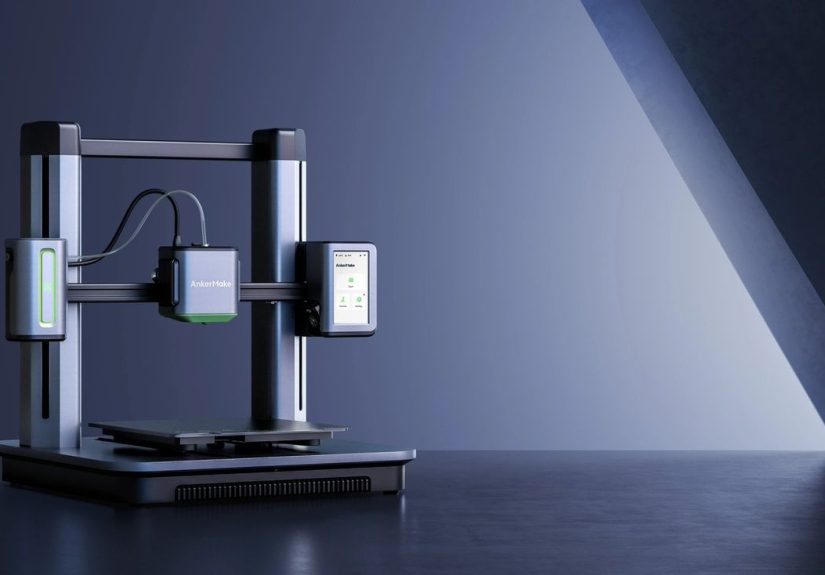
Anker’s first big 3D printer moment arrived with the AnkerMake M5, introduced as a consumer-friendly,
high-speed FDM 3D printer (that’s the filament kindspools of plastic, melted and layered into parts).
The pitch: faster printing without turning your finished object into a wobbly, stringy regret.
On paper, the M5’s speed story was attention-grabbing. Coverage around the launch highlighted a default print speed
around 250 mm/sa number that, compared to many mainstream hobby printers’ “comfortable” settings,
sounds like moving from a jog to a motorcycle. Anker also framed the printer as fast out of the box,
not “fast after you replace half the machine and earn an honorary degree in calibration.”
Just as important: Anker bundled features that many hobbyists usually add laterlike remote monitoring, timelapse
capture, and app controlinto the base experience. In other words, it teased a printer that behaves less like a finicky
science project and more like an appliance you can actually live with.
The Built-In AI Camera: A Webcam With a Job Description
Plenty of 3D printers can mount a camera. The difference is that Anker’s tease centered on a camera that’s not just there
to make satisfying timelapses for social mediait’s there to reduce waste and heartbreak.
If you’ve ever checked a print after two hours and found a plastic bird’s nest where your part should be, you understand
the emotional damage.
1) Failure detection (a.k.a. “Stop printing noodles, please”)
The AI camera concept was promoted as a way to detect common failure patternsthink layer separation,
nozzle clogs, and the infamous spaghetti messand then notify you. Some coverage described the system as
comparing the live print against expected progress so it can recognize when reality stops matching the plan.
The practical value here is simple: most print failures don’t fail politely. They fail dramatically, and they keep failing
until you stop them. Catching a failure early can save a big chunk of filament, reduce wear on the machine, and prevent
a minor mistake from becoming a molten plastic sculpture of sadness.
2) Auto-pause + alerts (the “text me before it gets worse” feature)
The tease included the idea that the printer could pause automatically if it sees something going wrong
and then send an alert to your phone. That’s a big deal for anyone who prints while working, sleeping, or pretending to be
a responsible adult in another room.
Even if auto-pause doesn’t save every print, it can save the printer from continuing to push hot filament into a jam
or dragging a blob across the build plate like it’s finger-painting.
3) Remote viewing, timelapse, and night monitoring
Anker’s tease leaned into a modern expectation: if your thermostat, doorbell, and robot vacuum have apps,
your 3D printer should too. Remote viewing lets you check progress without hovering like a helicopter parent.
Timelapse is both fun and surprisingly usefulwatching the layers build can help you spot subtle issues that you’d miss
in real time.
Some reporting around the M5 also emphasized night monitoring features (because print failures do not respect bedtime).
In the real world, that means less “Is that printer noise normal?” anxiety at 2 a.m.
Speed Claims: Fast Is Great, But Fast Needs a Seatbelt
Speed is the sexiest spec in 3D printinguntil speed shakes your model loose, ruins surface quality, or turns corners into
abstract art. Anker’s tease wasn’t just “we go fast,” but “we go fast and still behave.”
Coverage of the launch described the printer as using design choices meant to maintain stability at higher speeds,
along with features like auto-leveling and a more polished setup experience. This matters because most beginners don’t quit
3D printing due to a lack of creativity. They quit because their printer makes them feel like they’re losing a long argument
with physics.
In plain English: if a company can genuinely reduce the number of prints that fail and the number of hours spent tuning,
the hobby becomes dramatically more approachable.
Why an “AI Camera” Is a Smart Bet for Consumer 3D Printing
Let’s be honest: “AI” is sometimes marketing confetti sprinkled on normal features. But in 3D printing,
the camera-plus-analysis idea actually maps to a real problem: most failures are visual.
They show up as strings, blobs, layer shifts, gaps, or obvious “this is going badly” patterns.
That makes cameras a natural sensor. Unlike a temperature probe that only knows one number, a camera can see the entire scene:
the part, the nozzle path, and the type of mess that’s forming. If software can reliably identify a failure early,
it saves time and materialstwo things that frequently determine whether a beginner sticks with the hobby.
Even for experienced makers, monitoring matters because prints get longer as your ambitions grow. A small bracket might take
45 minutes. A cosplay helmet, a telescope accessory, or a functional prototype can take all day. If you can’t babysit a printer
for eight hours, automation becomes the difference between “fun tool” and “dusty garage monument.”
How It Compared to the “Classic” Hobby Experience
Traditional entry-level 3D printing often looks like this:
- You buy a printer because it’s affordable and popular.
- You spend a weekend leveling the bed, updating firmware, and learning why fans have opinions.
- Your first successful print feels like winning an Olympic medal in patience.
- Your second print fails because your cat walked too close to the table.
In that context, Anker’s tease was basically: “What if you didn’t have to do that?”
Not “what if 3D printing had zero learning curve,” but “what if the machine helped you catch problems and recover faster?”
The interesting part of the tease wasn’t just speed. It was the bundling of convenience: app control, monitoring,
notifications, and a camera system that’s meant to do more than record your failures in 1080p.
The Reality Check: Big Promises, Crowdfunding, and the Long Game
Anker’s early messaging and coverage made it clear the launch leaned on Kickstarter dynamicsearly pricing, strong claims,
and a promise of a smoother user experience. Crowdfunding can be a powerful way to gauge demand and fund manufacturing,
but it also comes with the usual caution: timelines shift, software matures over time, and “shipping soon” can mean
“shipping after you’ve learned to knit in the meantime.”
And here’s the bigger, more sobering lesson: the 3D printer market is hard. It’s not enough to ship a fast machine.
You need long-term support, replacement parts availability, consistent quality control, and software that keeps improving.
Years after the initial excitement, reporting indicated Anker paused or stopped selling its FDM printers and faced community
concerns about parts availability. That doesn’t erase the original innovation ideabut it does highlight how brutal the market is
once the headlines fade and real customers need real hotends.
The takeaway isn’t “never trust new printers.” It’s: when a brand teases a breakthrough, ask two questions:
Is the feature useful? and Will the company support it long enough to matter?
Who Benefits Most From an AI Camera 3D Printer?
Beginners
If you’re new to 3D printing, you don’t just need a printeryou need confidence. The AI camera concept offers a safety net:
you might still fail, but you’re less likely to waste an entire spool figuring out what a clogged nozzle looks like.
Busy makers and home offices
If your printer runs while you’re working, cooking, or parenting, remote monitoring and alerts are huge. You can check progress
between meetings instead of doing the “sprint to the garage” routine every 20 minutes.
Small shops and side hustles
If you sell printscustom accessories, tabletop terrain, prototypestime is money. Faster printing helps, but avoiding wasted
hours and wasted material can matter even more.
How to Get the Most Out of AI Monitoring
An AI camera can help, but it’s not a wizard. Think of it like a smoke detector: it can warn you fast, but it won’t stop you
from burning toast in the first place. If you want the best results from an “AI camera” style printer, focus on these habits:
-
Win the first layer. Most print failures start with poor adhesion. Clean your build plate, level properly,
and slow down the first layer if you need to. -
Stabilize the printer. High-speed printing amplifies wobble. Put the machine on a sturdy surface
and avoid shaky tables that behave like trampolines. -
Use the camera for diagnosis, not just vibes. Timelapses can reveal when a print started failing
which helps you fix the cause next time. -
Keep your nozzle and extruder healthy. If the AI keeps yelling at you, it might be time for maintenance,
not arguments. -
Don’t treat “AI” as permission to ignore basics. Good filament storage, correct temperatures, and sane speeds
still matter.
Real-World Experiences: What It’s Like When Your 3D Printer Has an “AI Babysitter” (500+ Words)
Imagine this: you start a print, walk away, and don’t immediately spiral into paranoid thoughts like,
“Did I hear a weird clicking noise? Was that the nozzle? Was that my soul leaving my body?”
That’s the psychological promise of an AI camera 3D printerless babysitting, more building.
In practice, the experience usually starts with a small victory. You print something simplea phone stand, a cable organizer,
a replacement knob for a kitchen drawer that’s been annoying you since 2019. You open the app, see the live view,
and you get that tiny thrill of modern life: “I am remotely supervising molten plastic. I live in the future.”
Then comes the first time the camera actually matters. Maybe the filament tangles. Maybe your part detaches halfway
through and turns into a sliding puck. Maybe the nozzle starts drawing stringy spaghetti because the temperature is slightly off.
On a traditional setup, you discover the disaster when it’s too lateafter the printer has enthusiastically created modern art
for three extra hours. With monitoring, you can catch it earlier. An alert pops up, you check the camera feed, and instead of
panicking you do something revolutionary: you stop the print before it becomes a plastic tumbleweed.
The second major “experience” is the confidence to run prints at inconvenient times. Lots of people end up printing overnight,
not because they love the soundtrack of stepper motors, but because daytime is busy and prints take time. This is where features
like night monitoring and quick check-ins shine. You don’t need to stare at the printer. You can glance at the feed, confirm the
first layers look clean, and go back to sleep without the constant “what if it’s failing right now?” anxiety.
Of course, no smart system is perfect. Some users learn that “AI detection” can be a little jumpy. A shadow shifts.
The lighting changes. Someone bumps the table. The camera decides something is suspicious and fires off a warning.
It’s like having a very enthusiastic intern: helpful, eager, and occasionally convinced that a normal situation is an emergency.
The upside is you’re alerted quickly. The downside is you might get a few “false alarm” moments before you tune settings and
learn what the system reacts to.
The sneaky, underrated experience is how the camera changes your relationship with printing. You become more adventurous because
you’re less afraid of wasting time. You try a taller print. You experiment with PETG or TPU. You print functional parts where
dimensional accuracy matters. And when you do get failures, you often learn fasterbecause you can literally watch when and how
things went wrong. That feedback loop turns “mystery failure” into “okay, that corner lifted at layer 12time to fix cooling or
adhesion.”
Finally, there’s the fun factor: timelapse videos. You tell yourself it’s for debugging, but let’s be realhalf the joy is
watching a tiny object rise from nothing like a time-traveling Lego set. The camera becomes part tool, part entertainment, and
part motivation. Even if you never post a timelapse online, seeing a clean print condensed into ten seconds makes the hobby feel
less like waiting and more like creating.
Conclusion: The Tease Was Bigger Than One Printer
When Anker teased its first 3D printer with a built-in AI camera, it wasn’t just flexing a featureit was pointing at a future
where consumer 3D printing gets easier, faster, and less failure-prone. Speed matters, sure. But convenience, monitoring,
and smarter error handling are what actually help people stick with the hobby.
Even with the market’s real-world turbulence and the hard lessons about long-term support, the core idea still holds:
3D printing becomes mainstream when printers reduce friction. And an AI camera that can catch disasters early
is one of the most practical “smart” upgrades a consumer 3D printer can have.