Table of Contents >> Show >> Hide
- Why This Topic Got So Much Attention
- What a “Rubber Ducky” Actually Means
- Why Cheap Hardware Made DIY Versions Possible
- The Real Attraction Was Never Just “Hacking”
- Why the Cheapest Route Is Usually the Messiest Route
- The Security Reality: Cute Price, Serious Implications
- Safer Maker Ideas Inspired by the Same Concept
- The Maker Experience: Cheap, Funny, and Weirdly Educational
- Conclusion
Some gadgets are expensive because they are powerful. Others are expensive because they are polished. And then there is the DIY Rubber Ducky idea, which became famous for a different reason entirely: it showed makers that a tiny USB gadget with keyboard-emulation abilities could be built around absurdly cheap hardware. In other words, the project had the same energy as the bath toy that inspired its nickname: small, funny-looking, and suspiciously affordable.
The phrase “DIY Rubber Ducky” usually refers to a low-cost, homemade alternative to the well-known USB Rubber Ducky tool popularized in hacker and maker culture. At a high level, these devices work by presenting themselves to a computer as a keyboard rather than as ordinary storage. That sounds harmless until you remember one important fact: computers trust keyboards. A keyboard is supposed to be human. A keyboard is supposed to be boring. A keyboard is not supposed to stroll in like a tiny overachiever and start typing at superhuman speed.
That trust model is exactly why the idea caught on. Hobbyists saw that inexpensive microcontroller boards could imitate USB Human Interface Devices, or HID devices, and suddenly a very specialized concept became accessible to tinkerers, students, security researchers, and people who cannot walk past a low-cost dev board without thinking, “I could probably make this do something ridiculous.”
Why This Topic Got So Much Attention
The fascination with a budget Rubber Ducky clone did not come out of nowhere. The original branded device earned a reputation as a compact keystroke-injection tool used in authorized security testing and demonstrations. It looked like a flash drive, but to a computer it behaved like a keyboard. That contrast was catnip for the maker world. It was clever, theatrical, and unnervingly efficient.
What turned curiosity into a movement was cost. Once the maker community realized that cheap USB-capable boards could mimic parts of the same behavior, the conversation changed from “What is that weird hacker gadget?” to “Wait, you can do something similar on hardware that costs less than lunch?” That is the headline magic behind “DIY Rubber Ducky Is As Cheap As Its Namesake.” The title works because it promises both mischief and thrift, which is basically the native language of hobby electronics.
But the price story only tells half of it. The bigger reason people cared is that this project sat at the crossroads of several trends: low-cost microcontrollers, open-source tooling, small-form-factor USB boards, and the growing realization that USB is less innocent than it looks. In the old days, many people thought of USB as the place where printers, thumb drives, and cable clutter went to retire. Makers saw something else: a universal doorway into automation.
What a “Rubber Ducky” Actually Means
Despite the cheerful name, a Rubber Ducky in this context is not a novelty toy with a USB plug glued into its beak. It is shorthand for a device that emulates a keyboard and sends pre-programmed keystrokes to a host computer. That makes it powerful for legitimate security research, lab testing, workflow automation, kiosk setup, repetitive IT tasks, and accessibility experiments. It also makes it dangerous in the wrong hands, which is why the topic always comes with an ethical asterisk the size of a beach umbrella.
The important technical idea is simple: when a device identifies itself as an HID keyboard, many operating systems accept it quickly because keyboards are considered normal input devices. That trust is great when you plug in an actual keyboard. It is much less charming when the “keyboard” is a tiny programmable board that types faster than you, never takes a coffee break, and has exactly zero fear of repetitive strain injury.
Hak5 helped turn that concept into a recognizable category, and over time the USB Rubber Ducky became part of both cybersecurity culture and maker lore. Later generations, updated scripting support, and a more polished ecosystem kept the product relevant. But the community also kept asking a classic hobbyist question: do I need the polished version, or can I get 70 percent of the idea with a $3 board and stubborn optimism?
Why Cheap Hardware Made DIY Versions Possible
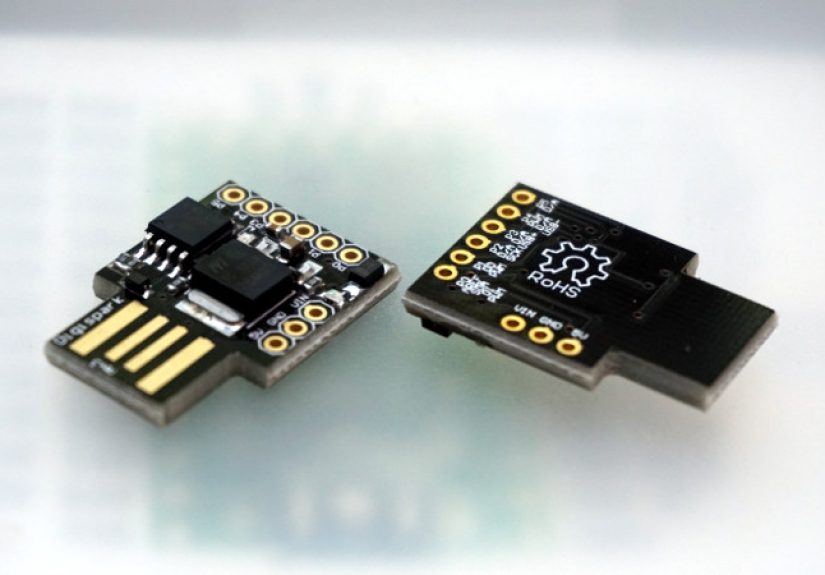
The DIY appeal lives and dies with the hardware. Very small development boards made around chips like the ATtiny85 became famous because they were tiny, cheap, and just capable enough to make people ambitious. That chip class was never a luxury yacht. It was more like a folding bicycle: compact, practical, and slightly heroic for its size.
Boards based on low-cost microcontrollers attracted experimenters for one obvious reason: affordability. If a project fails, you are out a few dollars instead of a chunk of your monthly gadget budget. That matters in the maker world, where the line between “prototype” and “drawer full of mysterious boards” is extremely thin.
Another reason is form factor. USB-sized development boards are irresistibly portable. They plug directly into a laptop, they do not require a separate power setup, and they make even tiny experiments feel polished. Some hobby boards rely on software tricks to approximate USB behavior, while other platforms with native USB support offer a smoother route for keyboard or HID-style projects. That is why discussions around DIY alternatives often spill over into boards like the Pro Micro, native-USB Trinket-class devices, and other miniature boards that can act like keyboards, macro pads, or test fixtures.
In plain English, the maker ecosystem created a perfect storm:
Cheap enough to experiment with
When the board costs almost nothing, curiosity wins. People are more likely to test ideas, break things, and learn through iteration.
Small enough to feel clever
A tiny USB board has theater. It feels smarter than it has any right to be. Even a simple automation project seems cooler when it fits in your pocket.
Open enough to inspire community projects
Once a concept can be discussed, adapted, and repurposed across open-source communities, it spreads fast. Some projects aim at security labs, others at accessibility, macro workflows, or one-button office shortcuts. The hardware does not care. It just waits for someone to decide whether this is going to be a useful tool or a very small bad idea.
The Real Attraction Was Never Just “Hacking”
One of the laziest ways to talk about this topic is to reduce it to movie-style cyber drama. In reality, part of the Rubber Ducky fascination comes from something much less glamorous: automation. Makers love removing friction from repetitive tasks. If a device can log into a test environment, fill out a fixed data field, trigger a demo sequence, launch a lab script, or help with accessibility workflows, that is interesting even without the black-hoodie mythology.
That is why DIY keyboard-emulation projects overlap with entirely harmless maker categories. Macro pads automate editing shortcuts. Accessibility devices turn physical switches into keyboard input. Kiosk tools can trigger repeatable setup sequences in controlled environments. Tiny boards can function as personal productivity helpers, one-key launchers, or demo props. The same underlying technology can support creativity, convenience, or abuse. The intent matters more than the board itself.
In other words, the board is not evil. It is just obedient. And as every experienced hobbyist knows, obedience in electronics is both wonderful and deeply suspicious.
Why the Cheapest Route Is Usually the Messiest Route
Now for the part nobody puts in the dramatic headline: cheap hardware is cheap for a reason. A homemade Rubber Ducky-style project may be affordable, but it is not necessarily elegant. Budget boards often come with compromises in memory, USB behavior, tooling, compatibility, reliability, or ease of programming.
Some boards need extra patience because they do not have native USB support in the way more modern platforms do. Others may behave differently across operating systems, hubs, or newer ports. Timing can get weird. Enumeration can get finicky. Drivers can be annoying. Bootloader behavior can feel like a test of character. At some point the project stops being “Look how cheap this is” and starts becoming “Why is my tiny plastic rectangle arguing with my laptop again?”
That trade-off matters. The branded product exists because convenience has value. A polished tool usually offers a smoother scripting experience, better documentation, easier updates, and fewer weird moments where you stare at a blinking LED like it owes you an apology. DIY versions win on price, but they often lose on refinement, support, and predictability.
So yes, the namesake may be cheap, but the learning curve can still send you an invoice.
The Security Reality: Cute Price, Serious Implications
This is where the article needs to put on grown-up shoes. The same trust model that makes keyboard-emulating devices useful also makes them risky. Security guidance has repeatedly warned organizations to control USB devices, restrict removable media, and lock down unnecessary physical ports. Industry security analyses of BadUSB and keystroke-injection attacks keep making the same point: the danger is not the plastic shell, but the device identity and the trust it receives.
That is why the smartest conversation around DIY Rubber Ducky projects is not “How cheaply can I copy this?” but “What is the responsible context for using this kind of hardware?” In authorized labs, training environments, product testing, or accessibility work, keyboard-emulation boards can be fascinating and legitimate. In unmanaged public settings, surprise plug-ins, or unauthorized systems, they cross a line fast.
If you are publishing, teaching, or demonstrating this topic, the safest approach is to focus on the economics, history, hardware design choices, defensive lessons, and ethical boundaries rather than on operational misuse. That does not make the topic less interesting. Honestly, it makes it more interesting, because now you are talking about the bigger picture: how cheap hardware can expose expensive assumptions.
Safer Maker Ideas Inspired by the Same Concept
The good news is that the core appeal of DIY keyboard-emulation hardware does not have to point toward misuse. Plenty of creative, ethical maker projects draw on the same foundation without becoming a problem for everyone else.
Personal macro tools
A single-button or multi-key device can trigger shortcuts for video editing, writing, coding, design software, or repetitive office tasks.
Accessibility helpers
Custom switches and alternative input devices can make computers easier to use for people with different mobility needs.
Lab automation in controlled environments
Test benches sometimes benefit from repeatable keyboard input for setup, demos, or QA workflows on machines you own and manage.
Educational HID demos
Teaching how USB trust works is valuable when the demonstration is transparent, authorized, and focused on defense as much as function.
These uses capture the fun of the platform without leaning into the sketchier side of its reputation. That, frankly, is a better long-term story for makers anyway. Cool hardware is more impressive when it solves something useful than when it merely proves it can be sneaky.
The Maker Experience: Cheap, Funny, and Weirdly Educational
For many hobbyists, the experience of exploring a DIY Rubber Ducky-style concept is less like a slick cyber-thriller and more like a comedy of tiny setbacks. First, there is the thrill of discovery. You see a board that costs almost nothing, plugs straight into USB, and promises keyboard-style interaction with a computer. Your brain immediately does the dangerous math of every maker: low price plus high potential equals “I should definitely try this.” That moment is universal. It is the same feeling that has launched thousands of projects, half-finished prototypes, and at least one storage box labeled “misc cables maybe important.”
Then comes the second phase: optimism. The project seems simple in theory. The board is small. The concept is small. The code should be small. How hard could it be? This is the stage where people imagine a crisp weekend experiment and maybe a triumphant social post. What they often get instead is a crash course in how USB behavior, board support, operating system quirks, and bootloaders can conspire to humble a very confident person before lunch.
Yet that struggle is exactly why these projects are memorable. They teach practical lessons fast. Makers learn that “cheap” and “easy” are not synonyms. They learn that device identity matters, that USB behavior is more nuanced than it looks, and that polished commercial tools charge money partly because they remove headaches. A bargain board can absolutely work, but it may also require patience, troubleshooting, and a willingness to accept that the tiniest hardware in the room can create the biggest debugging session.
There is also a very specific kind of delight that comes from seeing a tiny USB board do something unexpectedly sophisticated. Even when the safe use case is something boring like entering a repeated shortcut, triggering a demo, or launching a macro, the first successful interaction feels magical. It should not feel magical, of course. It is just a programmed device doing programmed things. But makers are not always rational people. We are still the species that gets excited when an LED blinks on purpose.
Another common experience is the ethical wake-up call. People start with curiosity about clever hardware and end with a sharper understanding of trust, security, and responsibility. That is actually one of the most valuable outcomes of the whole topic. A project that begins as “look what this tiny board can do” often becomes “wow, computers really do trust the wrong things quickly.” That shift in perspective is useful for developers, IT workers, hobbyists, and educators alike.
In the end, the experience is memorable not because the gadget is cheap, but because it exposes so much with so little. It reveals the gap between raw capability and polished design. It reveals the difference between a harmless automation toy and a serious security concern. And it reveals why the maker community keeps gravitating toward these projects: they are funny, clever, frustrating, eye-opening, and surprisingly educational all at once. The best version of the DIY Rubber Ducky story is not “I built a sneaky thing.” It is “I learned how much trust a tiny device can earn, how little hardware it takes to make a big impression, and how important it is to use that knowledge responsibly.”
Conclusion
“DIY Rubber Ducky Is As Cheap As Its Namesake” is a great title because it captures the whole appeal in one line: small cost, big curiosity, and just enough absurdity to make makers pay attention. The project became iconic not because it was the fanciest thing on a workbench, but because it proved that surprisingly cheap hardware could tap into a surprisingly powerful idea.
Still, the modern takeaway is bigger than thrift. Yes, low-cost boards made DIY versions possible. Yes, the maker spirit loves squeezing serious functionality out of tiny hardware. But the most important lesson is that USB trust, HID behavior, and automation tools deserve respect. The cleverest builds are the ones that pair technical ingenuity with restraint, transparency, and purpose.
So if the original Rubber Ducky made people gasp because it looked like a harmless flash drive with hidden talent, the DIY version made people grin for a different reason: it showed that with the right board, the right idea, and the right mindset, the cheapest gadget on the desk might also be the one that teaches you the most.