Table of Contents >> Show >> Hide
- Quick Specs & What You’re Buying
- How It Works (Without the Marketing Confetti)
- Setup & Everyday Use
- Performance in the Real World
- Subscription Costs & the “Ongoing Fee” Question
- Mini 2 vs. Other Options (and What to Buy Instead)
- Pros & Cons
- Who Should Buy the Garmin inReach Mini 2?
- Verdict
- Extra: of Real-World-Style Experiences With the Mini 2
- SEO Tags
If you’ve ever watched your cell signal disappear right as your hiking buddy says, “Don’t worry, I know a shortcut,”
you already understand the appeal of a satellite communicator. The Garmin inReach Mini 2 is one of the
smallest, most popular options for sending messages, sharing your location, and triggering an emergency SOS when you’re
way outside the reach of cell towers. It’s also frequently described as a “tiny satellite phone,” which is… sort of true,
in the same way a toaster is “basically a tiny oven.” It won’t place voice calls, but it will let you text over
satellite and talk back-and-forth with emergency responders if things go sideways.[2]
In this review, I’ll break down what the inReach Mini 2 does best (and what it doesn’t), how the GPS and satellite
messaging actually work, what real-world use feels like, and who should buy it in 2026even with newer alternatives on the market.[9]
Quick Specs & What You’re Buying
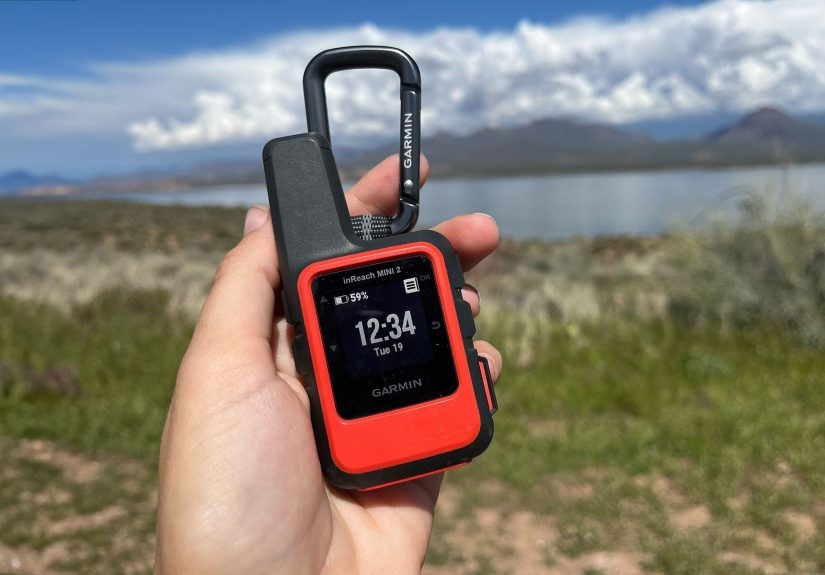
The Mini 2’s whole personality is “big capability, tiny footprint.” It’s designed to live on a shoulder strap or inside a
jacket pocket so you can access it quickly, not buried at the bottom of a pack under a week’s worth of trail mix.
| Size | About 3.9 x 2 x 1 inches[2] |
| Weight | About 3.5 oz (roughly 100 g)[2] |
| Durability | Water-rated to IPX7; rugged, impact-resistant build[2] |
| Battery (headline numbers) | Up to ~14 days (10-min tracking, standard activity) and up to ~30 days (30-min tracking with power-saving), depending on conditions[2] |
| Core functions | Two-way satellite messaging, location sharing/tracking, weather, and interactive SOS[2] |
Those “up to” numbers matter. Battery life and message performance change dramatically with canopy cover, terrain,
how often you track, and how much the device has to work to see satellites. In other words: open desert = easy mode;
dense forest = cardio for your battery.[6]
How It Works (Without the Marketing Confetti)
Satellite messaging: texting when the bars are gone
The inReach Mini 2 uses the Iridium satellite network for global two-way messaging and SOS. You can send messages directly
from the device, or pair it to your phone so you can type on a real keyboard (your thumbs will thank you).[6]
Important reality check: satellite messaging isn’t instant-message fast. In testing and field reports, messages can be quick
in open skyor take several minutes depending on satellite visibility and conditions. Plan on a “send window,” not a rapid-fire chat.[8]
GPS: where you are, where you were, and how to get back
The Mini 2 can record your track, help you follow simple navigation prompts, andmy favorite sanity featureuse
TracBack routing to guide you back along the path you took.[2] It also includes a digital compass, which
helps with heading information even when you’re standing still (a surprisingly common activity when someone says, “Wait… are we lost?”).[2]
SOS: not just a buttonan actual conversation
The headline safety feature is interactive SOS. If you trigger SOS, the Mini 2 can connect you to a 24/7
monitoring and coordination center, and you can exchange messages about what’s happeninginjury, location, resources, and
what help is needed.[2] Real-world accounts highlight how quickly communication can begin after pressing SOS, which is
exactly the point: clarity speeds up response.[5]
Setup & Everyday Use
Think of setup as “10 minutes of adulting that could save your skin later.” You’ll create an account, choose a satellite
subscription plan, set up emergency contacts, and configure preset messages (like “All good, camping here tonight”).
After that, daily use is straightforward: turn it on, confirm satellite view, and use it for check-ins, tracking, and weather.
Phone pairing: the difference between “usable” and “joyful”
Yes, you can type on the device. No, you probably won’t want to. Pairing with your smartphone makes messaging and navigation
far more pleasant, and it’s where the Garmin ecosystem shines: you can use companion apps to manage messages, maps, routes, and tracking.
The Garmin Messenger app also supports seamless switching between internet/cellular/satellite pathways depending on what’s available
(when paired with compatible devices and with an active satellite subscription).[10]
Maps: the Mini 2 is a communicator first, navigator second
If you’re expecting full-blown handheld GPS mapping on the Mini 2 itself, slow your roll. It’s not designed to replace a dedicated
navigation device or a phone loaded with offline maps. It does provide basic on-device navigation and a breadcrumb-style
track experience (especially useful with TracBack), and it becomes more “map capable” when paired with your phone via Garmin’s app ecosystem.[2]
For trip planning and map-heavy workflows, the Garmin Explore app is often the center of gravity: it supports offline map downloads,
topographic resources (including USGS quads), aerial imagery, route/waypoint management, and cloud syncing for your trip data.[11]
That’s a strong combo: your phone becomes the big screen, and the Mini 2 becomes the “still works when everything else doesn’t” lifeline.
Performance in the Real World
Messaging reliability
The best-case scenario is excellent: open sky, a good satellite view, and short messages tend to send reliably.
In tougher environments (slot canyons, thick canopy, steep valleys), expect slower sends and occasional retries.
Reviews and user reports commonly describe reliability as high overallbut not magical. If you treat it like a safety tool
(send check-ins early, keep messages short, be patient), it behaves like one.[6]
Battery life: the brochure vs. the forest
Garmin’s published battery life depends on tracking intervals and sky view. In practical use, outdoor reviewers emphasize that tree cover,
frequent tracking, and heavy messaging can reduce runtime drastically, while conservative settings can stretch it for long trips.[2][6]
The good news: the Mini 2 charges via USB-C, which is one less weird cable to carry. The better news: a small battery bank can keep it topped
up for extended trips, especially if you only need check-ins and SOS readiness rather than constant tracking.[4]
Weather: valuable, but use it like a forecast
Being able to pull a weather update in the backcountry can be genuinely trip-savingespecially in shoulder seasons, alpine zones,
or long-distance hikes where timing storms matters. Most users treat it as a “heads up” tool rather than a minute-by-minute meteorology feed,
and that’s the right mindset: a forecast is guidance, not a force field.[6]
Subscription Costs & the “Ongoing Fee” Question
Here’s the part nobody frames and puts on the wall: the inReach Mini 2 is not a one-time purchase if you want satellite messaging and SOS.
You’ll need an active subscription plan to send/receive satellite messages, share location via satellite, and use SOS services.[2]
Plan names and pricing can change, but the common structure is tiered monthly service with different message allowances and overage costs.
Many comparisons cite a broad range from lower-cost “safety” tiers to higher tiers for frequent messaging and tracking-heavy users,
which is why the Mini 2 makes the most sense for people who will actually use it regularlyor who value SOS enough to justify the fee.[9][7]
Practical budgeting tip: if you mostly want occasional check-ins and emergency coverage, choose the lowest tier that supports your use case.
If you’re guiding, thru-hiking, hunting off-grid, or coordinating logistics with family, a higher tier can quickly become worth it because
“peace of mind” is cheaper than “family panic spiral.”[7]
Mini 2 vs. Other Options (and What to Buy Instead)
Mini 2 vs. a newer inReach model
Garmin has released newer inReach devices since the Mini 2, including models that improve battery life and add modern messaging conveniences.
That doesn’t make the Mini 2 obsoleteit just changes the value proposition. If you can find the Mini 2 at a meaningful discount,
it remains one of the smallest ways to get two-way satellite messaging plus interactive SOS in a proven ecosystem.[9]
Mini 2 vs. a Personal Locator Beacon (PLB)
A PLB is the “break glass in emergency” tool: it transmits an emergency distress signal on 406 MHz for search and rescue, and registration is required
in the U.S. through NOAA (and is free).[12][13] Many PLBs don’t require a subscription for emergency transmission, but they generally
don’t offer two-way texting or routine check-ins the way an inReach does.[14]
Translation: if you want communication and the ability to clarify the situation with responders, the Mini 2 is compelling.
If you want a subscription-free emergency beacon and you don’t care about messaging, a PLB can be the better fit.
Mini 2 vs. a satellite phone
A true satellite phone is about voice calling (and often higher costs and bulk). The Mini 2 is about lightweight messaging,
location, and SOS. If you need voice coordination for work in remote regions, a sat phone may be justified.
If you’re a hiker, climber, paddler, hunter, or solo traveler who primarily needs safety and check-ins, the Mini 2 is usually the more practical tool.
Pros & Cons
What I love
- Tiny and light for how much safety it adds to a kit.[2]
- Two-way messaging over Iridium plus interactive SOS (not just a one-way beacon).[2][5]
- TracBack and basic navigation features provide a solid “Plan B.”[2]
- Strong companion app ecosystem for maps, trip planning, and easier messaging.[11]
- USB-C charging is simple and modern.[4]
What will annoy you (fair warning)
- Subscription required for the satellite features you actually bought it for.[2]
- Message delays happen, especially in tough terrain or heavy tree cover.[8]
- Not a full GPS mapping unityou’ll likely want your phone (offline maps) or a dedicated GPS for complex navigation.[3]
- Battery depends on conditions; forest and frequent tracking can shrink runtime fast.[6]
Who Should Buy the Garmin inReach Mini 2?
The Mini 2 makes the most sense if you:
- Regularly travel beyond cell coverage (hiking, backpacking, climbing, hunting, overlanding, paddling).
- Want to check in with family without relying on uncertain cell service.
- Care about having two-way emergency communication, not just a one-way distress signal.
- Prefer a small, strap-friendly device you’ll actually keep accessible.[2]
You might skip it if you only hike in popular, well-covered areas and you’re realistically never off-grid. Or if you want
advanced navigation on-device without pairing to a phonethere are better tools for that job.
Verdict
The Garmin inReach Mini 2 is a compact, rugged satellite communicator that earns its popularity by focusing on what matters:
reliable two-way messaging, location sharing, and interactive SOS in a form factor you can carry every time.[2]
It’s not perfect (subscription costs sting, and satellite messaging isn’t instant), but it’s one of the most practical
“insurance policies” you can clip to your pack.
Call it a tiny satellite phone if you wantbut the more accurate label is: tiny lifeline with GPS. And for a lot of
backcountry trips, that’s the label that counts.
Extra: of Real-World-Style Experiences With the Mini 2
To make this review more than a spec sheet wearing a trench coat, here are a few “this is what it feels like” scenarios that mirror
the most common ways people actually use the inReach Mini 2 in the wild.
1) The “Running Late” Check-In That Prevents a Family Freakout
You planned to be at the trailhead by 6:00 p.m. and you’re still two miles out at 6:15 because the “easy last ridge” turned out to be
made of loose rock and bad decisions. With cell service gone, the normal outcome is someone at home staring at the clock and imagining
a bear wearing your backpack like a trophy. The Mini 2 changes that with a simple message“Running late, all good”and suddenly the night
is calm again. This is the most underrated use case: not emergencies, just reassurance when plans shift.[4]
2) Weather as a Decision Tool, Not a Comfort Blanket
On longer trips, you stop treating weather forecasts like trivia and start treating them like strategy. A quick forecast can help you decide
whether to push over a pass in the morning, wait out a system, or pick a lower, safer campsite. The Mini 2 isn’t a meteorology lab, but it
can provide enough information to support better choicesespecially when you’re far from a ranger station and your phone is basically an
expensive camera at that point.[6]
3) The “I Can Get Us Back” Moment With TracBack
Most people don’t get truly lost; they get “temporarily geographically confused.” You followed an unmarked spur, wandered off-trail to avoid
downed trees, and now the landscape looks like you’ve been copy-pasted into a slightly different forest. TracBack is a quiet hero here: it can
guide you back the way you came without requiring full mapping on the device. It’s not flashy, but it’s incredibly comforting when your brain
starts doing that thing where it replays every survival documentary you’ve ever seen.[2]
4) The SOS Button You Hope to Never Press (But You Practice Anyway)
Responsible owners practice: they know where the SOS button is, how to unlock it, and how to communicate clearly if the worst happens. The “experience”
most people want is simpleif SOS is triggered, someone responds fast and communication starts quickly. Real-life testing stories emphasize how the value
is not just in sending an alert, but in the ability to exchange information that helps responders plan the right response.[5]
5) Battery Management Becomes a Trail Habit
After a few trips, Mini 2 users often settle into a routine: tracking interval set conservatively, Bluetooth off unless needed, and messages kept short.
You learn that open sky is your friend, that deep canopy eats battery, and that you don’t need to broadcast your coordinates every 30 seconds to prove
you’re still alive. The best “experience” is the one where the device becomes boringbecause boring means everything is working as intended.[6]
Put all that together and the Mini 2’s vibe becomes clear: it doesn’t replace skill, planning, or good judgment. It simply gives you better options
when the plan changeswhich is, inconveniently, what plans love to do.