Table of Contents >> Show >> Hide
- What the AD409-Max Actually Is
- Setup and First Impressions
- Image Quality and Working Distance
- Why It Works for Soldering
- Software, Capture, and Wi-Fi: Useful, but a Little Clunky
- Where the AD409-Max Beats Cheaper Digital Microscopes
- Where It Still Falls Short
- Who Should Buy the AD409-Max?
- Final Verdict
- Extended Hands-On Notes: What the AD409-Max Experience Feels Like in Practice
- SEO Tags
If you spend enough time around electronics, one truth eventually smacks you in the face with a tiny pair of tweezers: components keep getting smaller, but your eyeballs do not magically upgrade themselves. That is exactly where the AD409-Max microscope steps in. It is not trying to be a lab microscope for biology class, and it is not pretending to replace a high-end stereo inspection scope that costs as much as a mildly irresponsible weekend trip. Instead, it aims squarely at the workbench crowd: soldering, PCB inspection, rework, connector repair, and the kind of close-up work that makes your neck mutter rude things under its breath.
On paper, the AD409-Max looks almost comically feature-packed. You get a 10.1-inch screen, HDMI output, USB PC support, Wi-Fi, a 4MP sensor, up to 2160P recording, a remote control, built-in lighting, a silicone repair mat, helping hands, a tool holder, and even an auxiliary “endoscope” camera for side angles. That sounds less like a microscope and more like someone emptied a small electronics bench into one box and called it a day. Surprisingly, that is also the product’s appeal.
What the AD409-Max Actually Is
The AD409-Max is best understood as a digital soldering microscope workstation. That wording matters. It is a workstation first and a microscope second. The microscope head uses a 4-megapixel sensor and a 10.1-inch display with 1280 x 800 resolution, while product materials also advertise photo capture up to 24MP, recording up to 2880 x 2160 at 24 fps, 1080p at up to 60 fps, and 720p at up to 120 fps. The quoted “up to 300x” magnification is the kind of number you should treat like gym mirror math: technically useful, but not the real story. What matters in actual bench use is working distance, clarity, stability, and how easily you can get an iron, hot air nozzle, tweezers, and your hands under the lens without inventing new curse words.
And that is where the AD409-Max makes a strong first impression. The package is designed around electronics repair, not casual toy-level magnification. The included UV filter is there to help protect the lens from solder fumes, heat, and dust. The silicone mat and tool storage signal the same intent. This is not a “look at a leaf once and forget it in a drawer” microscope. It is built for bench duty.
Key Features That Matter in Real Life
There are a few specs worth caring about because they translate into actual usability. First, the 10.1-inch screen is a big deal. Tiny built-in displays on cheaper digital microscopes are often the optical equivalent of reading a street sign through a keyhole. Here, the larger screen makes framing work easier and reduces that cramped, hunched-over posture that turns a 20-minute repair into a neck-and-shoulder negotiation.
Second, the AD409-Max supports multiple output modes: built-in screen use, HDMI output, PC connectivity, and Wi-Fi. That gives it more flexibility than bargain-basement USB scopes that feel like they were engineered by a committee of optimism and compromise. If you want to throw the image onto a larger external monitor while doing fine rework, the HDMI option is a real advantage.
Third, the system includes an auxiliary side-view camera, marketed as an endoscope. For electronics work, that is more useful than it sounds. Looking straight down at a board is great for alignment, but side views can help you check lifted pads, solder fillets, connector walls, or the underside of awkward components without playing Twister with the board.
Setup and First Impressions
The AD409-Max does not arrive like a delicate scientific instrument in a velvet-lined drama box. It arrives like a practical tool system. Assembly is straightforward, and the included manual is good enough to get you moving without a ritual of trial, error, and suspicious button pressing. That said, this is still a modern electronics tool, so expect at least one moment where you stare at a setting and wonder whether the engineer who named it was having a long day.
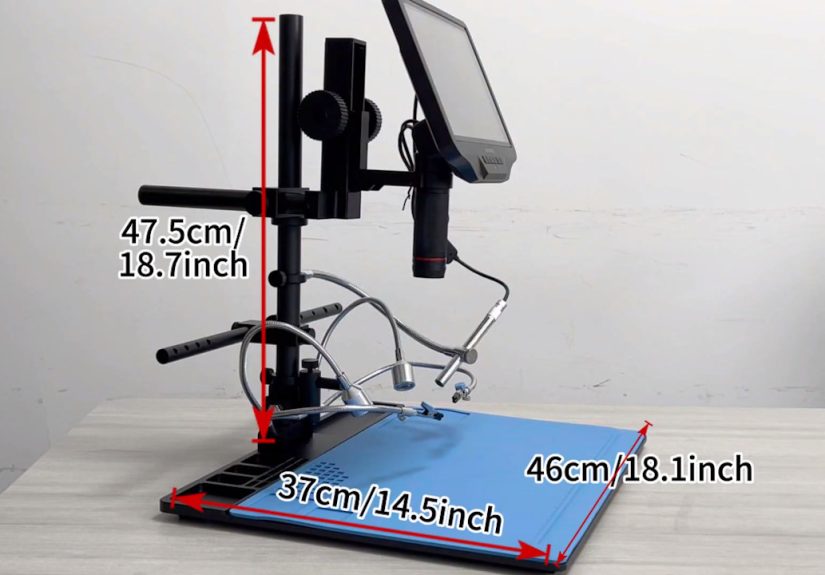
Physically, the standout feature is the oversized base and work area. Andonstar’s product pages push the idea of a “Super Max station” with a much larger workspace, and that theme shows up in actual use. The big base matters more than flashy spec-sheet bragging because it gives you room to move a real circuit board around instead of balancing it like a dinner plate on a coaster. If you work on dev boards, game console internals, laptop daughterboards, or larger repair jobs, that extra room is not a luxury. It is the reason the microscope feels like a bench tool instead of a tabletop gadget.
The included helping hands and tool holder are also more than filler accessories. Are they essential? No. Are they useful? Definitely. It is nice when the product does not assume the rest of your bench already looks like a NASA rework station.
Image Quality and Working Distance
Image quality is where the AD409-Max earns most of its goodwill. The picture is crisp enough for the jobs that matter: checking solder joints, reading tiny part markings, spotting bridges between fine-pitch pins, inspecting pads after wick cleanup, and generally answering the all-important question, “Did I fix it, or did I just make it shinier?”
The other star of the show is working distance. A digital microscope can have excellent image quality and still be miserable for soldering if the lens sits too close to the board. The AD409-Max largely avoids that trap. Hands-on impressions have praised the generous clearance under the lens, which means you can actually get tools and fingers into the workspace without feeling like you are performing surgery through a mail slot. That long working distance is one of the strongest reasons to choose a microscope like this over cheaper USB models.
It also helps that the built-in lights are mounted as adjustable side lights rather than a fixed “one-light-fits-all” approach. That gives you more control over reflections and shadows. On shiny solder joints, lighting angle matters almost as much as magnification. A little shadow can tell you more about shape and wetting than a flat, glare-heavy image ever will.
Why It Works for Soldering
Plenty of microscopes are good at magnifying things. Fewer are good at magnifying things while staying out of your way. The AD409-Max is clearly designed with rework in mind. The lens protection, the large mat, the open workspace, the tool holders, the helping hands, and the side lighting all point back to one use case: electronics bench work.
That becomes obvious the first time you imagine a real repair under it. Think about reattaching a lifted USB-C port shield tab, dragging solder across a row of QFP pins, replacing a tiny ceramic capacitor, or checking whether a bodge wire actually landed where you hoped instead of where fate wanted. These tasks do not just need zoom. They need space, stability, and repeatable visibility. The AD409-Max gives you all three more convincingly than a generic “USB microscope for coins and bugs” ever will.
It also helps newer hobbyists bridge the gap between “I can sort of solder” and “I can confidently work on small SMD parts.” That is not because the microscope turns you into a wizard. It does not. It just removes one of the biggest sources of frustration: not being able to clearly see what your iron tip is doing. Once you can see better, technique becomes easier to practice.
Software, Capture, and Wi-Fi: Useful, but a Little Clunky
Here is where the AD409-Max stops being charmingly over-equipped and starts feeling slightly cobbled together. The hardware is the main event. The software side is more of an opening act that showed up late and is still adjusting the microphone.
The manual lists PC support for Windows XP, 7, 8, and 10, along with measurement software. That tells you two things immediately. One, measurement features exist. Two, the software ecosystem is not exactly cutting-edge. The manual also notes that measurement accuracy depends on proper calibration and keeping focal length and magnification consistent, which is fair enough for this class of tool. In other words, you can do measurement tasks, but this is not metrology equipment pretending to be affordable. It is a bench microscope that also happens to do measurement if you treat setup carefully.
Wi-Fi is even more revealing. The manual literally labels Wi-Fi as a test function, and hands-on coverage suggests it works, but not in a way that feels wonderfully seamless. The microscope creates its own hotspot, and the companion app experience is more “functional gadget utility” than “beautiful modern workflow.” Handy for occasional remote viewing or saving media? Sure. A reason to buy the microscope? Not even close.
Capture features are still nice to have. Taking photos or recording video is helpful for documentation, tutorials, repair notes, and showing someone else exactly which microscopic disaster you are trying to fix. Just do not expect the media workflow to be the emotional centerpiece of ownership.
Where the AD409-Max Beats Cheaper Digital Microscopes
The easiest way to appreciate the AD409-Max is to compare it with the flood of cheaper digital microscopes online. Those lower-cost options often look tempting because they promise huge magnification for tiny prices. Then you discover the stand wobbles, the screen is too small, the working distance is stingy, the lighting is mediocre, and the whole thing feels like it was designed by someone who has never actually reworked a board.
The AD409-Max addresses those weak points directly. The stand is more serious. The workspace is larger. The screen is bigger. The lighting is more adjustable. The included accessories are aimed at actual repair. And the entire package feels closer to a purpose-built electronics station than a generic magnifier with marketing ambition.
That does not make it cheap, but it does make the price easier to defend. You are paying for ergonomics and workflow, not just a sensor and a screen.
Where It Still Falls Short
The AD409-Max is good, but it is not magic. Cable management appears to be one of its weaker points, and that makes sense once you realize how many subsystems are involved: screen, main camera, lights, side camera, external outputs, power, storage, and remote control. It is useful, but it is also the kind of tool that can make your bench look like a spaghetti summit if you do not organize it.
There are also little signs that the whole system is made from several decent ideas assembled into one ambitious product. That is not a deal-breaker. It just means the microscope sometimes feels more practical than elegant. Some features are excellent, some are convenient, and a few are there because apparently nobody at the factory believed in the phrase “good enough.”
The other honest limitation is this: if you are a die-hard stereo microscope person, the AD409-Max will not convert you by force. A true binocular optical scope still offers a different experience, especially for depth perception and long work sessions. But those scopes bring their own trade-offs in price, capture convenience, and bench footprint. The AD409-Max belongs to the digital camp, and within that camp it is a strong contender.
Who Should Buy the AD409-Max?
If you do regular soldering, PCB inspection, console repair, connector replacement, modding, or electronics assembly, the AD409-Max makes a lot of sense. It is especially appealing for hobbyists moving beyond basic through-hole work and into SMD territory. It also fits makers who want one tool that handles live work, inspection, photos, and occasional documentation without requiring a full microscope-and-camera custom setup.
If, however, your work is mostly occasional, or you only need quick magnification for reading part numbers once in a blue moon, this may be more bench than you need. Likewise, if you already own a good stereo microscope and love it, the AD409-Max is more likely to be a complementary digital workstation than a replacement.
Final Verdict
The AD409-Max is not perfect, but it gets the important things right. It offers strong image quality, generous working room, soldering-focused ergonomics, flexible output options, and a bench-friendly design that feels intentionally built for electronics work. Its weaknesses are mostly on the integration and software side, not the core viewing experience. That is the right place to have flaws.
Put simply, this is a microscope for people who actually plan to use a microscope. Not as décor. Not as a one-weekend novelty. Not as a “someday I’ll learn microsoldering” guilt purchase. It is a practical, capable digital microscope station for real bench work, and that makes it easy to recommend to the right kind of user.
Extended Hands-On Notes: What the AD409-Max Experience Feels Like in Practice
The most interesting thing about the AD409-Max is not any single headline spec. It is the feeling you get when you imagine putting it on a busy bench and actually living with it for a few weeks. A lot of tools look wonderful in product photos and then become mildly annoying the moment a real project starts. This one seems to do the opposite. At first glance, it can look almost over-accessorized, like somebody in product development got too excited and kept adding useful objects until the shipping box filed a complaint. But in day-to-day bench work, that “everything and the kitchen sink” approach starts making sense.
You set it up, place a board on the mat, angle the screen, nudge the lights, and suddenly the whole system feels less like a microscope and more like a tiny repair desk sitting on top of your desk. That is the AD409-Max’s big trick. It lowers the friction between “I should inspect this” and “I’m already working.” You are not digging out separate helping hands, improvising light placement, or balancing a board under a too-short stand while your iron approaches from some impossible angle like a confused helicopter. The microscope, mat, clamps, and storage all live in one ecosystem, and that matters more than spec-sheet theater.
The first real test for a microscope like this is usually something humble: a bad solder joint, a tiny bridge, a connector pin that looks suspiciously crooked. The AD409-Max seems strongest in exactly that sort of moment. You are not chasing ultra-scientific magnification. You are trying to answer practical questions quickly. Is that pad intact? Did the solder actually flow? Is that resistor marked correctly, or am I hallucinating because it is midnight and I have been staring at matte-black components for an hour? A good bench microscope should make those questions boring to answer. Boring is success.
Then there is the comfort factor. Cheap microscopes often demand strange compromises. You hunch. You squint. You shift the board three times. You move the lamp. You question your life choices. The AD409-Max looks like it avoids a lot of that drama. The larger screen lets you work in a more natural posture, and the broad work area means the board is less likely to feel trapped inside a tiny optical parking space. That does not sound glamorous, but ergonomics is what separates a tool you tolerate from a tool you keep using.
Of course, the ownership experience is not all smooth jazz and perfect solder fillets. The cable situation can get messy, and the software side feels more functional than polished. Wi-Fi sounds cooler in a bullet list than it probably feels in regular use. But that is also why the AD409-Max comes across as honest. The features that matter most to repair work are the features that seem to work best: screen, image, space, lighting, clearance, and overall bench friendliness. Everything else is extra seasoning. Nice to have, occasionally clumsy, but not the reason you bought the steak.
If that sounds like faint praise, it is not. In electronics tools, dependable practicality is often the highest compliment. The AD409-Max does not need to be romantic. It just needs to help you see clearly, work comfortably, and avoid turning a tiny repair into a giant annoyance. By that standard, it looks like a very smart addition to the modern hobbyist or repair bench.