Table of Contents >> Show >> Hide
- What Counts as an NPC You Can Command in Fortnite?
- How to Give Commands to NPC Characters in Fortnite: 3 Steps
- Why NPC Commands Matter More Than Most Players Think
- Quick Troubleshooting: If the NPC Command Isn’t Working
- Best Situations to Use Each Fortnite NPC Command
- Fortnite NPC Commands and Season Changes: What Stays the Same?
- Extra 500-Word Experience Section: What Real Matches Feel Like When You Actually Command NPCs
- Conclusion
Fortnite has a lot going on at any given moment: third parties, storm rotations, someone shockwaving into your personal space, and that one teammate who swears they “totally had heals.” In the middle of all that chaos, hired NPCs (especially Specialists) can be surprisingly useful. They can follow you, hold position, move where you want, and sometimes even help with revives.
The catch? Many players hire an NPC and then never actually command themso the poor bot just jogs behind them like an unpaid intern. If you want to get more value out of your Gold Bars, this guide breaks down exactly how to give commands to NPC characters in Fortnite in 3 simple steps, plus practical tips, troubleshooting advice, and real in-match examples.
One quick note before we jump in: Fortnite changes often. NPC rosters, hire costs, and even quest wording can shift from season to season. The good news is that the core process for commanding a hired NPC remains very similar: hire the right NPC, open the command wheel, and choose the command.
What Counts as an NPC You Can Command in Fortnite?
Not every NPC on the island is hireable, and not every hireable character behaves the same way. In many seasons, the commandable ones are “Specialists” (like Scout, Heavy, Medic, and Supply), but Fortnite has also rotated in other themed hired characters depending on the season.
In plain English: if the NPC gives you a Hire option and becomes your ally, you can usually issue commands through the follower communication wheel.
How to Give Commands to NPC Characters in Fortnite: 3 Steps
Step 1: Find and Hire a Commandable NPC (Usually a Specialist)
First, you need an NPC who will actually join your squad. Walk up to a hireable character, interact with them, and choose the Hire option from the dialogue/interaction menu. This usually costs Gold Bars, and the price can vary depending on the season and character.
If you’re hunting one specifically for a quest, check your map and quest tracker first. Fortnite often helps by marking or hinting at the correct NPC type (for example, a Medic or Supply Specialist). Also, if another player already hired or eliminated that NPC, you may need to rotate to another location.
Pro tip: Land near the NPC early in the match if you’re doing a quest. The longer you wait, the greater the chance someone else grabs them first.
- Look for: an NPC with a speech bubble icon and a Hire option
- Bring: enough Gold Bars
- Expect: some NPCs to be unavailable if another player got there first
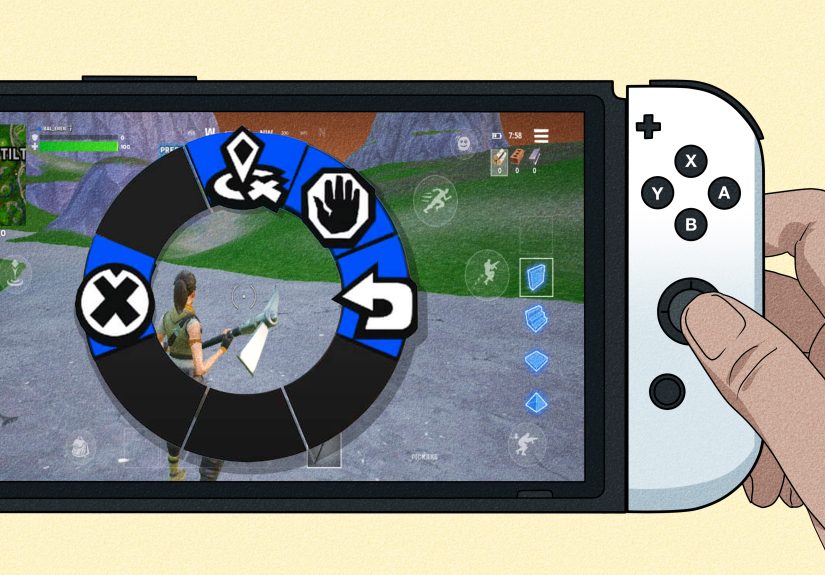
Step 2: Open the Follower Command Wheel (Use the On-Screen Prompt)
Once the NPC is hired, Fortnite shows a command prompt on your HUDtypically near the top-left area of the screen, under or near your player info. This is the key detail many players miss. If you don’t see the prompt, double-check that the NPC is actually hired and currently following you.
On many default setups, the command wheel is opened by:
- PC (default in many guides): Hold the middle mouse button
- Controller (PlayStation/Xbox, common default): Hold Left on the D-pad
However, Fortnite keybinds can change, and some players customize controls. So the best move is to trust the on-screen command icon/prompt rather than memorizing a single button forever.
When you open the wheel, you’ll usually see a radial menu (the follower comms wheel). This is where the magic happensand where your NPC stops freelancing.
Step 3: Choose the Command You Want (and Use It at the Right Time)
After opening the follower command wheel, select the command that fits your situation. The exact labels can vary a little by season, mode, or NPC type, but these are the most common command options players see:
- Wait / Stay Tell the NPC to hold position.
- Move Send the NPC to a marked or targeted location.
- Follow Bring them back to tailing you (default behavior).
- Revive / Heal-related support Available in certain situations or with certain NPCs/modes.
In some versions of the system, you may also see a Dismiss option (or a “hold to dismiss” prompt) to send the NPC away entirely. Handy if the storm is closing and your bot is loudly revealing your stealthy bush career.
The biggest mistake players make is using commands randomly. A better approach is to use commands with a purpose:
- Use Move to scout a rooftop, doorway, or hill before you push.
- Use Wait to set a mini-guard post while you loot nearby.
- Use Follow after rotating so your NPC doesn’t get lost in Narnia.
- Use Revive support when available in team modes after a knock.
Why NPC Commands Matter More Than Most Players Think
A hired NPC is not a replacement for aim, positioning, or good decisionsbut it is an advantage. Think of a hired Specialist as a noisy but useful teammate with infinite patience. Even when they don’t get eliminations, they can:
- Draw enemy attention
- Force opponents to reveal positions
- Buy you time to heal or reposition
- Add pressure during a push
- Help with support tasks in certain team situations
For quests, commands also matter because many Fortnite challenges are weirdly specific. You may need to hire a Specialist, give a command, or hire a certain type (like Medic or Supply). Knowing the command wheel workflow saves time and avoids those “Why isn’t this quest completing?” moments.
Quick Troubleshooting: If the NPC Command Isn’t Working
1) “I hired an NPC, but no command prompt appears.”
Make sure the NPC is actually hired (not just interacted with). If you bought an item or talked to them but didn’t select Hire, they won’t join you and the command menu won’t appear.
2) “The button I used before doesn’t work now.”
Fortnite updates and control remaps can change this. Check your current keybinds and watch the HUD prompt. If you customized ping/communication controls, the follower command wheel may be tied to that input.
3) “My quest says give a command, but it won’t complete.”
Try selecting a different command and confirm you hired the right NPC type (for example, a Specialist instead of a regular service NPC). If the NPC was hired by another player first, you may need a fresh match.
4) “My NPC keeps doing something dumb.”
First of all, welcome to Fortnite. Second, use Wait or Move more often. Players who rely only on Follow tend to get less value because the NPC pathing can be chaotic in tight spaces.
Best Situations to Use Each Fortnite NPC Command
Use “Move” When:
- You want to check a suspicious building
- You need a distraction before peeking
- You’re pushing high ground and want extra pressure
Use “Wait/Stay” When:
- You’re looting a multi-room area and don’t want the NPC wandering
- You want to hold an angle while rotating around a structure
- You’re trying to avoid giving away your exact position
Use “Follow” When:
- You’re rotating to zone
- You’re leaving a POI
- You need backup in the next fight immediately
Use “Revive” (when available) When:
- You’re in Duos/Trios/Squads and someone gets knocked
- You need to keep pressure while support starts a revive
- You want to avoid overcommitting into a risky revive angle
Fortnite NPC Commands and Season Changes: What Stays the Same?
Fortnite is famous for changing systems, menus, quests, and item pools. One season’s hire cost may be different from another, and the roster of hireable characters can rotate. But the core loop remains familiar:
- Find a hireable NPC
- Spend Gold Bars to recruit them
- Use the follower comms/command wheel to issue orders
That’s why learning the process matters more than memorizing one season’s exact NPC names or locations. Once you know the system, you can adapt quickly to new quests and seasonal updates.
Extra 500-Word Experience Section: What Real Matches Feel Like When You Actually Command NPCs
If you’ve never used NPC commands in Fortnite, your first few matches will probably look like this: you hire an NPC, feel extremely clever for about 12 seconds, then immediately forget they exist while looting ammo. Suddenly you hear gunfire behind you and panic, only to realize your hired Specialist is firing at someone you didn’t even notice. Congratulationsyou accidentally discovered why NPC commands are useful.
One of the most common experiences players have is the “silent scout” moment. You’re approaching a house or ridge and suspect someone is there, but you don’t want to be the first one to peek. If you send your NPC with Move toward that position, enemies often react to the NPC before they react to you. Even if the NPC doesn’t survive long, the opponent has now revealed their location, weapon type, and sometimes whether they’re playing aggressively or defensively. That is priceless information in a fast fight.
Another experience that comes up a lot is using Wait as a low-budget security guard. Let’s say you’re looting a spread-out POI and don’t want your NPC stomping around every room behind you. Parking them near an entrance can reduce the chaos. They won’t perfectly “hold the line” like a tournament teammate, but they can create pressure and noise that buys you a second or two. In Fortnite, one or two seconds is often the difference between getting deleted and getting a clean reset.
Team modes create even better moments. If you’re in Duos, Trios, or Squads, commanding a support-style NPC can make messy fights feel more manageable. When someone gets knocked, the ability to delegate part of the chaoswhether that’s a revive-related command or just positioning the NPC bettercan keep your squad alive long enough to turn the fight. It’s not guaranteed, but it absolutely changes the rhythm of some engagements.
Of course, there are funny failures too. NPC pathing can be unpredictable. Sometimes your “brilliant tactical move” becomes your NPC sprinting directly into a wall, taking the scenic route around a staircase, or getting distracted mid-fight. That’s why experienced players treat NPCs as a bonus tool, not the centerpiece of their strategy. You still need smart rotations, good cover, and decent aim.
The best way to build confidence is to practice in low-pressure matches. Hire an NPC early and intentionally test each command once: Follow, Wait, Move, and any support/revive option available. Try sending them to a rooftop, parking them by a door, and recalling them when zone moves. After a few matches, the command wheel starts feeling natural. And once that happens, you’ll stop thinking of hired NPCs as “random bots” and start using them like what they really are: a small tactical advantage you paid for with Gold Bars.
Conclusion
Giving commands to NPC characters in Fortnite is one of those small mechanics that can make a big difference. It only takes three steps: hire a commandable NPC, open the follower command wheel, and select the right command for the situation. Whether you’re completing a quest, scouting a risky building, or creating a distraction before a push, a well-commanded NPC can give you extra value in almost any match.
And honestly? If Fortnite is already chaotic, you might as well make the chaos work for you.