Table of Contents >> Show >> Hide
- What “Object Tracking” Means on a Camera Slider (and Why It’s Not Magic)
- Why Object Tracking + Sliding Motion Looks So Good
- The Core Parts of an Object Tracking Slider Setup
- How to Choose the Right Object Tracking Slider for Your Shooting Style
- Practical Setup: Getting “Nice Shots” Without the Usual Pain
- Five Shot Ideas That Make a Tracking Slider Worth It
- Common Problems (and How to Fix Them Before They Ruin Your Day)
- Slider vs Gimbal: When the Slider Wins (and When It Doesn’t)
- Buying Checklist: The “Don’t Regret This Purchase” Edition
- Conclusion: Yes, It Really Can Get the Nice Shots
- Creator Experiences: What It’s Like Shooting With an Object Tracking Slider (The Real-World, Slightly Chaotic Version)
You know that feeling when you watch a clip and your brain goes, “Ooh… fancy.” The camera glides, the subject stays locked in frame,
the background does that delicious parallax thing, and suddenly your humble kitchen counter looks like a premium commercial set.
That, my friend, is the vibe an object tracking camera slider can deliverespecially when you’re shooting solo and your “camera crew”
is basically you, a caffeine habit, and a tripod that squeaks when you look at it.
This article breaks down what an object tracking slider is, why it makes footage look more expensive than it has any right to,
what features actually matter (and which ones are pure “spec-sheet cosplay”), and how to use one without accidentally filming
a beautiful, cinematic close-up of… absolutely nothing.
What “Object Tracking” Means on a Camera Slider (and Why It’s Not Magic)
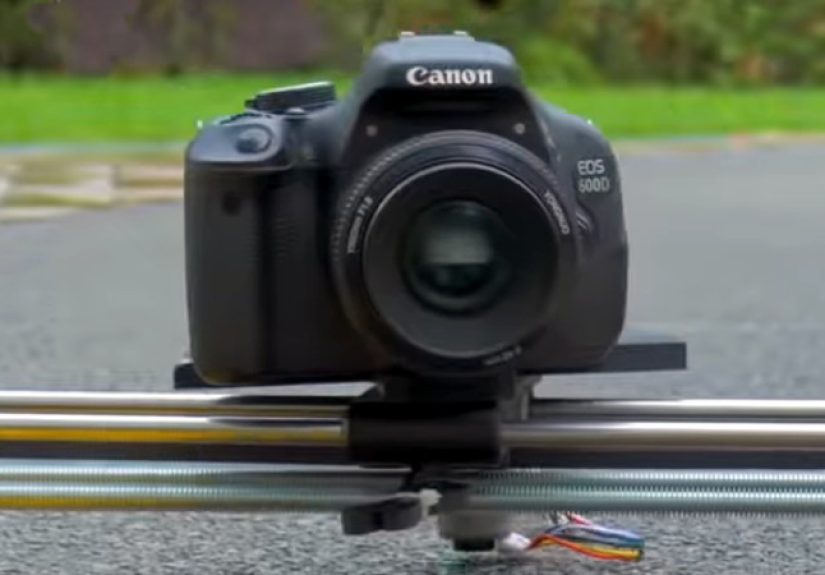
A traditional slider simply moves your camera smoothly along a rail. An object tracking setup adds “brains” to keep a chosen subject
framed as the camera travels. That tracking can happen in a few different ways:
1) Vision-based tracking (face/object detection)
This is the “tap the face, it follows” style. A camera-control app (usually via a companion module and mobile feed) identifies a subject
and keeps them centered by adjusting pan/tilt while the slider moves. It’s the closest thing to having a tiny camera operator living inside your rig.
2) Point tracking / target tracking (motion math, not eyeballs)
Instead of recognizing a face, the system locks on to a point in space. As your slider travels, the head automatically pans/tilts to keep that point
framed, creating clean parallax moves that look intentionally designed (because they are).
3) Keyframed tracking (you tell it what to do)
You program start and end positions (and sometimes midpoints), and the head “tracks” by following your instructions. It’s not AI tracking,
but it’s repeatable and extremely useful for product shots, tabletop work, and controlled scenes.
The big takeaway: “object tracking” can mean different things depending on the system. If you’re buying, you’re not shopping for a vague superpower
you’re choosing which kind of tracking fits how you shoot.
Why Object Tracking + Sliding Motion Looks So Good
There are three reasons these shots instantly feel more “pro,” even when you’re filming your cat like it’s the star of an award-winning documentary:
Parallax: the cheat code for depth
When the camera slides sideways, foreground and background shift at different rates. That’s parallax, and it’s the visual equivalent of
adding “production value seasoning” to anything on screen.
Subject stays framed while the world moves
A smooth slide is nice. A smooth slide where the subject stays locked and confident in the frame is chef’s kiss. Your viewer’s brain reads it as
“intentional,” and intentional is basically the definition of cinematic.
Repeatability = consistency
If you shoot products, food, tutorials, or social content that needs multiple takes, repeatable motion means you can reshoot a clip without
reinventing the wheelor the wobble.
The Core Parts of an Object Tracking Slider Setup
Most tracking slider rigs are really a team-up of components. Think of it like a band:
the slider is drums (steady rhythm), the motor/controller is bass (power and timing), and the pan/tilt head is the lead singer (the thing everyone notices).
Motorized slider (the “glide”)
- Travel length: more travel gives more parallax, but longer rails need more support.
- Payload: include camera + lens + head + quick release + monitor + microphone = your real weight.
- Drive type: belt-driven (often quieter/smoother) vs leadscrew (often precise and compact, sometimes slower).
- Mounting options: center mount, dual tripod support, tabletop feet, vertical/angled capability.
Pan/tilt head or motion head (the “tracking”)
- 2-axis (pan/tilt): enough for most subject tracking.
- 3–4 axis systems: can add roll/focus control for advanced moves.
- Smooth acceleration: matters more than top speed.
- Repeatability: crucial for VFX plates, product shots, and matching takes.
Control app / interface (the “brain”)
The best systems are fast to set up and predictable. The worst ones bury basic actions behind menus like it’s an escape room.
Look for simple A/B moves, keyframes, ease-in/ease-out, timelapse modes, and (if you want AI tracking) a reliable way to select and re-acquire subjects.
How to Choose the Right Object Tracking Slider for Your Shooting Style
If you film people (interviews, talking head, solo creator setups)
Prioritize reliable tracking, quiet motors, and quick setup. A slider that takes 25 minutes to calibrate is not “cinematic,” it’s “a hobby.”
Face tracking can be a big win for solo operatorsespecially for multi-angle interviews, live demos, and presentations.
If you shoot products (e-commerce, tabletop, food, gear reviews)
Prioritize repeatability, micro-smooth motion, and the ability to do subtle moves. A tiny slide can look gorgeous on a 50mm lens,
but only if the motion is butter-smooth and the rig is rock solid.
If you shoot action (sports, events, pets with zero respect for blocking)
Vision-based tracking is helpful, but don’t assume it’s a miracle. Fast movement, occlusion (someone walks in front), and low light can challenge tracking.
In these cases, a shorter, faster move with simpler framing often beats a long, complicated slide.
If you shoot travel
Prioritize portable weight, quick leveling, and power that doesn’t require a suitcase of batteries.
Compact sliders and lightweight heads can still produce premium motionespecially if you keep shots short and intentional.
Practical Setup: Getting “Nice Shots” Without the Usual Pain
Step 1: Level first, then obsess
Tracking looks smarter when your horizon isn’t quietly drifting into chaos. Level the slider, lock your tripod(s), and make sure nothing flexes.
If you can wobble the carriage by tapping it lightly, the camera will translate that into “micro-jitter: the sequel.”
Step 2: Balance your payload like it owes you money
If you’re using a pan/tilt head, balance your camera (and any accessories) so the motors aren’t fighting gravity. Motors that struggle can introduce
vibration and inconsistent speed. Translation: your “nice shot” becomes “why does this feel nervous?”
Step 3: Choose a tracking style that fits the scene
- Face/object tracking: best for people moving unpredictably.
- Point/target tracking: best for parallax around a fixed subject (product, statue, centerpiece, hero object).
- Keyframes: best for repeatable takes and controlled environments.
Step 4: Use cinematic speed, not “theme park ride” speed
Sliders shine in slow, controlled motion. If the move feels fast, shorten the travel or increase the duration.
A 6–12 inch slide can look expensive if it’s smooth and motivated.
Step 5: Lock settings to avoid “camera brain drift”
Auto exposure and auto focus can change mid-move and ruin consistency. For the cleanest look:
- Use manual exposure when possible.
- Consider manual focus for product shots; use continuous AF carefully for faces.
- Keep shutter speed stable (especially under flickery lights).
Five Shot Ideas That Make a Tracking Slider Worth It
1) The “Hero Product Orbit (but not really an orbit)”
Slide left-to-right while point-tracking the product’s logo. Add foreground elements (a plant, a glass, a tool) for parallax.
Instant commercial energy, even if you filmed it on a desk next to yesterday’s coffee ring.
2) The “Solo Tutorial Follow”
If you teach cooking, crafts, or tech, face/object tracking can keep you framed while the slider adds motion.
It’s subtle, but it transforms “static demo” into “confident production.”
3) The “Interview Drift”
A slow slide during an interviewwhile keeping eyes framed properlyadds life without stealing attention.
The key is gentle speed and a stable head movement that doesn’t look like it’s hunting.
4) The “Reveal”
Start behind an object (a lamp, a plant, a door frame), slide to reveal your subject, and keep them tracked.
Your audience feels like they’re discovering somethingbecause you literally made the camera discover it.
5) The “Timelapse With Purpose”
Timelapse plus motion control can look incredible. Add a small slide and a pan that keeps a building or landmark framed.
Just remember: stable support matters more in timelapse because tiny wobbles become very visible when accelerated.
Common Problems (and How to Fix Them Before They Ruin Your Day)
“My footage has tiny jitters.”
- Support longer sliders with two tripods.
- Reduce payload or rebalance the head.
- Slow the move and add easing (gentle acceleration/deceleration).
- Check that your tripod head or quick release isn’t flexing.
“Tracking keeps losing the subject.”
- Improve lighting and contrast on the subject.
- Avoid extreme side angles where faces disappear.
- Reduce movement speed so the system can keep up.
- Keep the subject from being blocked (occlusion is the enemy).
“The move looks… robotic.”
- Add easing to start/stop.
- Shorten the move so it feels intentional.
- Use a foreground element for depth and motivation.
- Pair motion with story: reveal, emphasize, follow a gesture, highlight a detail.
Slider vs Gimbal: When the Slider Wins (and When It Doesn’t)
A gimbal is amazing for dynamic movement and following action through space. But a slider has two huge advantages:
precision and repeatability. If you want a controlled parallax move, a consistent product push, or a trackable,
repeatable shot that can be matched across takes, sliders are hard to beat.
The sweet spot is often: gimbal for “moving with the world,” slider for “moving like you planned this all along.”
Buying Checklist: The “Don’t Regret This Purchase” Edition
- Payload (real payload): include head + camera + lens + accessories.
- Stability: can it mount securely, and do you have the support to use it properly?
- Tracking type: AI tracking, point tracking, or keyframeswhat do you actually need?
- Noise level: if you record dialogue, noisy motors can become your new villain.
- Control workflow: can you set a shot quickly, repeat it, and save presets?
- Power: battery life and charging options that fit your shoots.
- Portability: if it’s annoying to carry, you’ll “totally use it next time,” forever.
Conclusion: Yes, It Really Can Get the Nice Shots
An object tracking camera slider is one of the fastest ways to make footage feel premiumespecially for solo creators.
It adds depth with parallax, keeps attention on your subject, and turns “static” into “story.”
The trick is choosing the right tracking approach for your work and building a stable, repeatable setup.
Do that, and your camera stops looking like it’s just recording things… and starts looking like it has opinions.
Creator Experiences: What It’s Like Shooting With an Object Tracking Slider (The Real-World, Slightly Chaotic Version)
Here’s the funny truth: the first time you set up a tracking slider, you will feel like a wizard. The second time, you’ll feel like a wizard who forgot
where they put their wand. By the third shoot, you’ll have a rhythmand that’s when the “nice shots” start showing up consistently.
One common experience for solo creators is realizing how much a slider changes your on-camera energy. With face tracking enabled, you can stop doing the
awkward “stay perfectly still or you’ll walk out of frame” performance. You can gesture naturally, lean toward the product you’re explaining, and even move
a step or two to demonstrate something. The camera quietly keeps you composed. The result feels more confident, like you’re hosting a show instead of
apologizing for a setup.
Product shooters often describe the slider as a “discipline tool.” The motion is so clean that it makes messy styling look… extra messy. A tracking slide
past a product highlights everything: fingerprints, uneven labels, crooked props, dust that your eyes ignored until the lens turned it into a giant floating
asteroid. Over time, people build a routine: wipe the product, lock the set, check the background, then run the move. The slider doesn’t just add motion;
it forces a level of polish that translates directly into more professional-looking footage.
Then there’s the timelapse crowd. The first time you combine a slow slide with a pan that keeps a landmark framed, you’ll watch the finished clip and wonder
if you accidentally became a National Geographic cinematographer overnight. But you also learn quickly that timelapse is unforgiving. Tiny vibrations become
visible, wind becomes a problem, and “good enough” tripod placement turns into a lesson in humility. People end up using heavier support than they expected,
adding sandbags, and keeping moves shorterbecause a stable short move looks far better than a long move that jitters.
Event shooters have their own love-hate story. The slider gets beautiful establishing shots: décor details, venue reveals, rings on a table, the cake
(before someone attacks it with a knife). But events also move fast. The practical experience is that you don’t use the slider for everythingyou use it for
moments where controlled motion adds meaning. Many creators plan three to five “slider moments” per event and execute them quickly, rather than trying to
turn the whole shoot into a motion-control film set.
The most relatable experience might be the “tracking confidence curve.” At first, you’ll run slow moves and keep the subject big in frame so tracking is easy.
Then you’ll get brave and try a tighter shot, a longer slide, or a subject that turns away. Sometimes it works beautifully; sometimes the system “hunts”
and your clip becomes a cinematic documentary about a camera trying to find a human. The win is learning your gear’s comfort zonehow fast it can move,
how well it re-acquires subjects, what lighting helps, and when a simple keyframed move is smarter than vision tracking. Once you learn that, the slider stops
being a gadget you’re testing and becomes a tool you’re using.
The final “aha” moment many creators report: the nicest shots come from restraint. The best slider clips usually aren’t dramatic rollercoaster moves.
They’re short, stable, eased in and out, with a clear purposereveal, emphasize, follow, or elevate a detail. When you treat motion like punctuation
instead of the whole sentence, the footage looks expensive. And yes, you will absolutely start sliding your camera past everyday objects just to see if
they look like an ad. (Spoiler: a well-lit sandwich with parallax can look suspiciously heroic.)