Table of Contents >> Show >> Hide
- What Is a Software-Defined ROM, Anyway?
- From SDRR to One ROM: Evolution of a Hack
- Key Features That Make One ROM Stand Out
- Design Challenges: Fitting Modern Brains in Old Sockets
- Why One ROM Matters for the Retrocomputing Community
- How You’d Use a One ROM–Style Board in Practice
- The Bigger Picture: Software-Defined Hardware Meets Classic Microcomputers
- Real-World Experiences with One ROM and Software-Defined ROMs
- Conclusion: A Modern Brain, a Vintage Soul
If you’ve spent any time trying to keep a Commodore 64, VIC-20, or PET alive in 2025, you already know one universal truth:
the silicon never forgets, but the ROM chips absolutely do. Original masked ROMs are aging out, replacements are scarce, and
every “new old stock” listing feels like a gamble. That’s where the idea of a software-defined ROM comes in
and why Hackaday’s latest coverage of One ROM has retro fans grinning like it’s 1983 all over again.
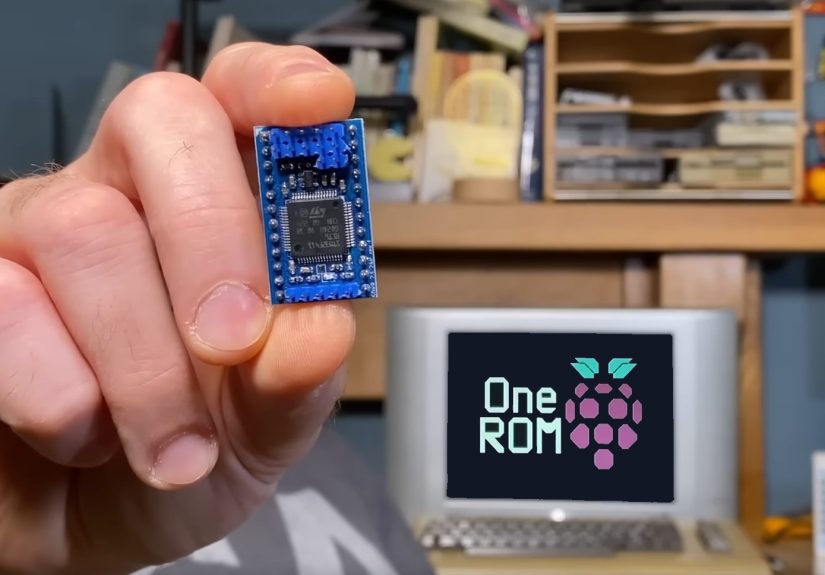
One ROM is the newest, polished incarnation of a project that started life as the Software Defined Retro ROM (SDRR): a clever
way to emulate classic ROM chips using modern microcontrollers and some smart firmware. Instead of hunting down fragile chips,
you drop in a tiny PCB with a brain, load whatever ROM image you want, and let software pretend to be hardware. It’s one ROM
to rule them all and yes, the pun is fully intentional.
In this deep dive, we’ll unpack what a software-defined ROM actually is, how One ROM evolved, why the move to the Raspberry Pi
RP2350 matters, and how hobbyists are using this tech to keep vintage machines running, modded, and just a bit more fun.
What Is a Software-Defined ROM, Anyway?
In classic 8-bit hardware, a ROM chip (Read-Only Memory) holds fixed firmware: your BASIC interpreter, character set, or disk
drive controller code. It’s literally wired into the machine’s address and data buses. When the CPU requests a byte from a
particular address, the ROM responds with the right value. No code, no boot, no fun.
The problem? These original ROMs are read-only in the most painful sense. Replacing them usually means burning EPROMs or
flash chips, dealing with programmers, erasers, adapters, and the occasional “oops, I soldered it in backward” moment.
And if a ROM dies in a beloved 1541 disk drive or C64, original parts are increasingly rare.
A software-defined ROM flips that model. Instead of a mask-programmed chip, you use a small
microcontroller board that:
- Electrically mimics the footprint and pinout of the original ROM package.
- Monitors the system’s address and control lines in real time.
- Serves up the correct bytes from a flash-stored ROM image fast enough to keep an 8-bit CPU happy.
From the computer’s perspective, it’s still talking to a simple ROM. Under the hood, there’s firmware decoding addresses,
juggling multiple ROM images, and responding at microsecond timescales. Thanks to modern MCUs with cheap on-chip flash and
high-speed GPIO, this is both practical and surprisingly affordable.
Why Microcontrollers, Not FPGAs?
You could build a ROM replacement using an FPGA, and people have. But FPGAs tend to be pricier and more complex to work with,
especially for hobbyists. Microcontrollers hit a sweet spot: they’re inexpensive, easy to program, and more than fast enough
for 1 MHz-era hardware. In many embedded applications, MCUs win on cost and simplicity, while FPGAs are reserved for
performance-critical or highly parallel tasks. For a C64 ROM, a well-chosen microcontroller is basically overqualified in a
good way.
From SDRR to One ROM: Evolution of a Hack
Before it was called One ROM, the project existed as the Software Defined Retro ROM (SDRR), created by
hardware hacker Piers Finlayson. The SDRR used an STM32F4 microcontroller on a small PCB shaped like a 24- or 28-pin DIP
chip, making it a plug-in replacement for common Commodore ROMs such as the 2316, 2332, and 2364 families.
SDRR already did something magical: one tiny board could emulate multiple ROMs. You could swap between a C64 KERNAL, BASIC,
and character ROM; or drive ROMs for a VIC-20 or 1541, just by changing configuration pins and flashing different images.
Videos and write-ups showed it happily booting a range of machines with no drama beyond the usual retro wiring spaghetti.
As the project matured, it got a new name One ROM and a major internal upgrade. Instead of relying only
on the STM32 lineup, the latest revision embraces the Raspberry Pi RP2350 microcontroller. That choice
unlocks some important capabilities for retro gear.
Meet the New Brain: Raspberry Pi RP2350
The RP2350 is Raspberry Pi’s next-generation microcontroller, building on the RP2040 formula but adding more horsepower,
features, and critically for this project, better 5 V friendliness via external circuitry. That matters because many 8-bit
systems including the Commodore 64 and its peripherals speak in 5 V logic, not the 3.3 V levels modern chips prefer.
The latest One ROM design uses the RP2350 on a compact, two-layer PCB that still fits within the tight physical envelope of a
classic ROM. The board exposes all the familiar address, data, and control pins to the host computer while keeping the
microcontroller and support components tucked neatly into the space the original chip used to occupy.
Earlier SDRR revisions with STM32 were already impressive, but the RP2350-based One ROM version adds:
- Better support for 5 V systems with appropriate interfacing on a compact board.
- Enough performance headroom to handle tight timing on a variety of 8-bit machines.
- Modern development workflows familiar to the Raspberry Pi community.
“Fire” and “Ice”: Hardware Flavors
The project offers different board “flavors,” often dubbed things like One ROM “Fire” (RP2350-based) and “Ice” (STM32-based).
Both share the same fundamental idea software-defined ROM images on a microcontroller but give builders options depending
on parts availability, voltage requirements, and personal preference.
Behind the scenes, the firmware abstracts away the details: whether you prefer Raspberry Pi tooling or STM32 workflows, you
still end up with a ROM drop-in that can pretend to be a handful of vintage chips on command.
Key Features That Make One ROM Stand Out
Plenty of projects have implemented ROM emulation, but One ROM leans hard into being practical, flexible, and cheap enough to
sprinkle through your retro collection without guilt. Some standout features include:
1. Drop-In Replacement Footprint
The PCB is designed to match the footprint of original ROM packages. That means:
- No flying-wire Frankenstein builds just to make things line up.
- No weird overhanging daughterboards blocking nearby sockets or heatsinks.
- You simply remove the old chip, plug in One ROM, and you’re back in business.
For crowded machines like the C64 or classic disk drives, keeping the profile tight is critical, and the layout is optimized
to respect those physical constraints.
2. Multiple ROM Images on a Single Board
One of the coolest tricks is the ability to store and select between multiple ROM images:
- Standard versus custom KERNAL ROMs on a C64.
- Different drive firmwares on a 1541.
- Experiment builds for in-development ROM hacks.
Instead of burning a new EPROM every time you tweak a few bytes, you change a jumper, update a config, or flash a new image,
and you’re back to boot-testing in seconds, not hours.
3. USB and Browser-Based Programming
Some One ROM variants include support for USB programming and even browser-based flashing workflows. Rather than digging out
a dedicated ROM programmer, you connect the board, pick the image you want to load, and let the tooling take care of the
rest. For tinkerers who live in VS Code and Git these days, that’s significantly more friendly than vintage EPROM gear.
4. Low Cost, High Impact
Thanks to modern fabrication services and commodity microcontrollers, One ROM boards can be produced very cheaply in modest
quantities. Having a handful on hand makes it easy to standardize your repair or modding workflow: one design, many machines,
fewer headaches. It turns ROM emulation from a one-off hack into a reusable part of your retro toolbox.
Design Challenges: Fitting Modern Brains in Old Sockets
Making a software-defined ROM work isn’t just about slapping a microcontroller onto a PCB and calling it a day. The latest
One ROM revision had to navigate several real-world engineering constraints.
Two-Layer PCB vs. Four-Layer Convenience
Modern PCB design tools make four-layer layouts comparatively easy, but cost and DIY-friendliness still favor two-layer
boards for many hobby projects. The One ROM PCB sticks to two layers, which keeps fabrication options broad including the
possibility of home etching or milling for the truly hardcore but makes routing high-density footprints like the RP2350
more challenging.
The RP2350 package includes large power and ground pads underneath the chip. In older layouts, this central area was useful
for dropping vias to the opposite side of the PCB. Now that it’s reserved for solid ground and thermal connections, signal
routing has to snake around more carefully. Combine that with a fixed, DIP-sized outline and specific pin mapping, and the
layout becomes an exercise in careful compromise and iteration.
Timing and 5 V Interfacing
On the electrical side, the ROM replacement needs to:
- Respect the bus timing of 8-bit CPUs, which expect data to be valid within a tight window after address lines settle.
- Handle 5 V signals safely when the microcontroller speaks 3.3 V internally.
- Tri-state appropriately when the host isn’t actively reading from ROM, so it doesn’t fight with other devices.
Level shifting, careful firmware loops, and deterministic GPIO response all come into play. The end result is a board that
behaves, electrically, like the original ROM even though its “memory” consists of flash blocks and C code.
Why One ROM Matters for the Retrocomputing Community
On paper, One ROM is “just” a clever drop-in replacement. In practice, it solves several problems at once for the
retrocomputing scene.
Extending the Life of Vintage Machines
Original ROMs failing is a constant theme in vintage computer repair. When a KERNAL or drive ROM dies, you’re often stuck
hunting sketchy auction listings or cannibalizing another machine. A reliable, repeatable ROM emulator turns that crisis into
a minor inconvenience: you diagnose the issue, confirm the ROM is bad, and drop in a One ROM board with the appropriate
image.
Because you can keep backups of known-good images, you’re no longer dependent on aging physical chips. It’s like having a
time machine that only stores firmware.
Lowering the Barrier for ROM Hacking
ROM hacking used to require a full toolchain of programmers, erasers, and adapters. One ROM flips that workflow into
something much closer to modern software development:
- Pull the ROM image into your favorite hex editor or disassembler.
- Make your changes, assemble a new binary, and flash it to One ROM.
- Power-cycle the machine and instantly test the result.
Rapid iteration is the key to experimentation. Whether you’re rewriting the C64 KERNAL, adding custom drive commands, or
building a teaching demo for students, a software-defined ROM makes the entire process less painful and way more fun.
Standardizing Repairs and Mods
Once you trust a design like One ROM, it becomes a standard part you can document and reuse. Repair guides can say “install
a One ROM configured for the stock 901227-03 KERNAL,” and everyone knows exactly what that means. Modders can distribute
custom ROM images that hobbyists load onto an off-the-shelf One ROM board instead of worrying about specific EPROM
programmers or obscure chip types.
How You’d Use a One ROM–Style Board in Practice
So what does this look like if you’re a hobbyist with a flaky C64 or a cranky 1541 drive on the bench? A typical workflow
might look like this:
- Assemble or order the PCB. You either build your own boards from the open design files or order them from a fab service that handles assembly.
- Flash the firmware. Use the project’s recommended toolchain to load the ROM emulator firmware onto the microcontroller.
- Load the ROM images. Select the correct ROM binaries (e.g., KERNAL, BASIC, character ROM) and flash them into the board’s storage.
- Configure jumpers or settings. Some variants use configuration pins to choose which ROM image to present on which address range.
- Install in the target machine. Remove the old ROM, plug in the One ROM, and verify the orientation and pin alignment.
- Power on and test. If all goes well, your retro computer boots like normal just with a tiny modern brain pretending to be vintage silicon.
From there, you can start getting fancy: switching ROMs with jumpers, testing beta firmware, or running alternate character
sets and diagnostics without ever touching a UV eraser.
The Bigger Picture: Software-Defined Hardware Meets Classic Microcomputers
The “software-defined” label has been popularized by technologies like software-defined radio, where fixed-function RF
hardware is replaced by programmable digital signal processing. The same philosophy is creeping into vintage computing:
instead of relying on brittle, single-purpose chips, we use flexible, programmable equivalents that mimic them closely
enough to keep the magic alive.
In educational settings, a board like One ROM doubles as a fantastic teaching tool. You can show students how ROMs fit into a
classic microcomputer, then flip to the firmware and demonstrate how software can emulate that behavior in real time. It’s a
bridge between old and new: 6502-era bus cycles on the outside, modern microcontroller firmware on the inside.
For the retro scene, it’s also a hedge against scarcity. As original chips age and supplies dwindle, software-defined
replacements help ensure that these machines remain more than just museum pieces. They’re still usable, moddable, and
hackable exactly the way their creators would have wanted.
Real-World Experiences with One ROM and Software-Defined ROMs
All of this sounds great in theory, but how does a software-defined ROM actually fare on real desks and in real workshops?
The answer, judging by community feedback, is “surprisingly well” with a side of “why didn’t we have this ten years ago?”
From Skepticism to “Live-Programmable ROM”
In retro forums, some early reactions questioned the phrase “software-defined ROM.” To a few purists, that sounded like
marketing spin for something that was basically a microcontroller pretending to be a chip. But as users started testing
early SDRR boards, the conversation shifted from definitions to performance.
One commenter summed up the experience by calling it more of a “live-programmable ROM” something you can update and reload
almost instantly while still behaving like a traditional read-only device from the computer’s point of view. That ability to
tweak firmware, reflash, and reboot in rapid cycles is especially attractive for developers working on new ROM hacks or
debugging stubborn systems. When flash times are measured in seconds, not minutes, experimentation becomes addictive in the
best way.
Bringing Multiple Machines Back from the Brink
A common pattern in user stories goes like this:
- A hobbyist rescues a batch of old gear say, a C64, a VIC-20, and a 1541 drive from a garage or eBay lot.
- At least one machine has a bad ROM: random crashes, black screens, or drives that won’t initialize.
- Instead of hunting down three different replacement chips, they drop in a single One ROM board configured for each system in turn.
With a bit of jumper wrangling and careful flashing, one small board can stand in for several different ROMs. That’s huge for
people who maintain multiple machines or help others repair theirs. It turns One ROM into a kind of “universal donor” for
classic firmware.
Some users describe using One ROM as a diagnostic tool: if a suspect machine suddenly springs to life with a known-good ROM
image on One ROM, you’ve confirmed that the original chip was the culprit. If it still misbehaves, you know to look
elsewhere no sacrificial EPROMs required.
Modern Workflows for Retro Firmware
Another big win is how naturally One ROM slots into the workflows of today’s makers. Many developers already keep their ROM
hacks, patches, and disassemblies in Git repositories. A One ROM-based setup lets them:
- Track changes to firmware alongside source code and build scripts.
- Automate conversions from assembler output to ROM images as part of their build pipeline.
- Flash new images during development using familiar USB or command-line tools.
Instead of bridging a 40-year tooling gap, One ROM lets you treat vintage ROMs like any other firmware project. You edit,
commit, build, flash, and test the fact that the target is a 1980s home computer instead of a modern IoT device becomes
almost incidental.
Teaching, Demos, and Live Experiments
Educators and meetup organizers are also finding creative uses for software-defined ROMs. Imagine walking a class through
how a BASIC interpreter fits into the memory map of a C64, then flipping a switch and booting into a custom teaching ROM that
logs instructions or displays memory usage in real time. Later, you swap in a diagnostic ROM that tests RAM, I/O, and video
circuits all without changing the physical chip.
For live demos, this flexibility is gold. One ROM makes it easy to prepare a menu of ROM configurations ahead of time, then
showcase them on a single machine: original firmware, enhanced firmware, experimental builds, and even intentionally “broken”
ROMs that help demonstrate failure modes. It’s a way to make old hardware feel interactive and alive, not just static relics.
Limitations and Things to Watch
Of course, no approach is perfect. Users do report a few caveats:
- Very timing-sensitive edge cases on some systems may require firmware tuning.
- Not every obscure ROM type or custom board is supported out of the box; some hardware hacking is still required.
- If you’re aiming for museum-grade authenticity, a software-defined ROM is still a substitute, not an original part.
But for the vast majority of practical repairs, daily use, and experimentation, One ROM hits a sweet spot: it behaves like a
real ROM where it counts, but gives you capabilities the original designers could only have dreamed of.
Conclusion: A Modern Brain, a Vintage Soul
One ROM, as spotlighted by Hackaday, isn’t trying to replace the charm of vintage hardware it’s trying to preserve it. By
wrapping a modern microcontroller and thoughtful firmware into a ROM-sized package, it gives retrocomputers a new lease on
life while making repair and experimentation far more accessible.
For collectors, it’s a safety net. For hackers, it’s a playground. For educators, it’s a living bridge between eras of
computing. And for that Commodore sitting sadly on your shelf with a dead KERNAL, it might just be the difference between
staying a display piece and booting up to a ready prompt one more time.
In the end, that’s the quiet genius of One ROM: it uses thoroughly modern tricks to let very old machines keep doing what
they do best inviting us to tinker, learn, and have a little fun along the way.