Table of Contents >> Show >> Hide
- What “Spacecraft Avionics” Actually Means (and Where cFS Fits)
- Meet cFS: NASA’s Reusable Flight Software Framework
- The Layer Cake: OSAL, PSP, cFE, Libraries, and Apps
- Command & Telemetry in cFS: How the Spacecraft Talks (and Listens)
- “Open Source” Isn’t a Test Plan: Flight Readiness and Verification
- Real-World Adoption: From CubeSats to Commercial Moon Landers
- Getting Started With cFS (Without Summoning a Thousand-Page Build Error)
- Concrete Examples: What You Can Build With cFS Building Blocks
- Design Patterns That Make cFS Systems Easier to Fly
- Common Pitfalls (A.K.A. “How We Learned to Stop Worrying and Love the Table CRC”)
- Conclusion: Why cFS Is a Big Deal for Open Source Spacecraft Avionics
- Field Notes: Experiences You’ll Have When You Actually Work With cFS (About )
- SEO Tags
Spacecraft avionics is the polite, professional phrase for “the onboard brain that keeps your very expensive space thing
from doing something deeply embarrassing on live telemetry.” It covers the computers, interfaces, and flight software that
tell a spacecraft when to wake up, what to point at, how to talk to Earth, how to keep itself healthy, andwhen necessary
how to admit it has no idea what’s happening and retreat into safe mode like a possum playing dead.
If you’re building flight software today, you don’t have to start from a blank file called main.c and a pile of
existential dread. NASA’s Core Flight System (cFS) is an open, reusable flight software framework that helps
teams assemble robust spacecraft avionics by combining a common runtime, standardized services, and a catalog of flight-ready
building blocks. It’s been used across everything from tiny CubeSats to major missionsand it’s also friendly enough for labs,
prototypes, and even Raspberry Pi demos when you want to learn without risking a spacecraft (or your reputation).
In this guide, we’ll unpack how cFS works, what makes it “open source avionics” in a practical sense, and how teams actually
use it to move faster without turning “faster” into “fragile.” We’ll also cover real examples, design patterns, and the gotchas
that show up right after the demo “works on my machine.”
What “Spacecraft Avionics” Actually Means (and Where cFS Fits)
In aircraft, avionics includes navigation, communications, monitoring, and control. Spacecraft avionics is the same idea,
except your repair shop is 400,000 km away and the tow truck is the laws of physics.
A typical spacecraft avionics stack includes:
- Hardware: processors, buses, memory, timing sources, watchdogs, sensors, and device interfaces.
- Boot + RTOS/OS: a real-time operating system (often) plus the low-level board support needed to run reliably.
- Flight software framework: common services, messaging, app lifecycle management, and configuration mechanisms.
- Mission apps: attitude control, power management, payload control, data handling, fault protection, autonomy logic, etc.
- Ground interface: commanding, telemetry, file transfer, logs, and operational tooling.
cFS lives in the “framework + reusable services/apps” layer: it doesn’t replace hardware or your RTOS, and it doesn’t magically
write your mission logic. Instead, it gives you a consistent, portable way to build and run mission software as a set of
pluggable applications that communicate through standardized services.
Meet cFS: NASA’s Reusable Flight Software Framework
cFS vs. cFE: the “little c” story
cFS is often described as a layered ecosystem, and at the center of that ecosystem is the Core Flight Executive (cFE).
Think of cFE as the mission-agnostic runtime that hosts your flight software apps and provides the core services those apps rely on.
The “little c” in cFS is a nod to a lean core concept: keep the center small, modular, and reusablethen build mission
capability via apps and configuration rather than a monolith.
In practice:
- cFE provides the runtime environment and core services.
- cFS typically refers to cFE plus the platform abstraction layer (OSAL/PSP), libraries, and a set of reusable apps/tools.
Why open source matters (beyond the warm fuzzies)
“Open source spacecraft avionics” isn’t about vibes; it’s about inspectability, reuse, and
ecosystem gravity. When the framework is open:
- Teams can audit behavior down to the service and API level.
- Organizations can share improvements and reduce duplicated effort.
- Training and onboarding get easier because the tooling and patterns are consistent.
- Prototypes can evolve into flight systems without a total rewrite.
The practical catch: open source doesn’t remove mission responsibility. You still own verification, validation, and flight readiness.
cFS gives you a head startnot a free pass.
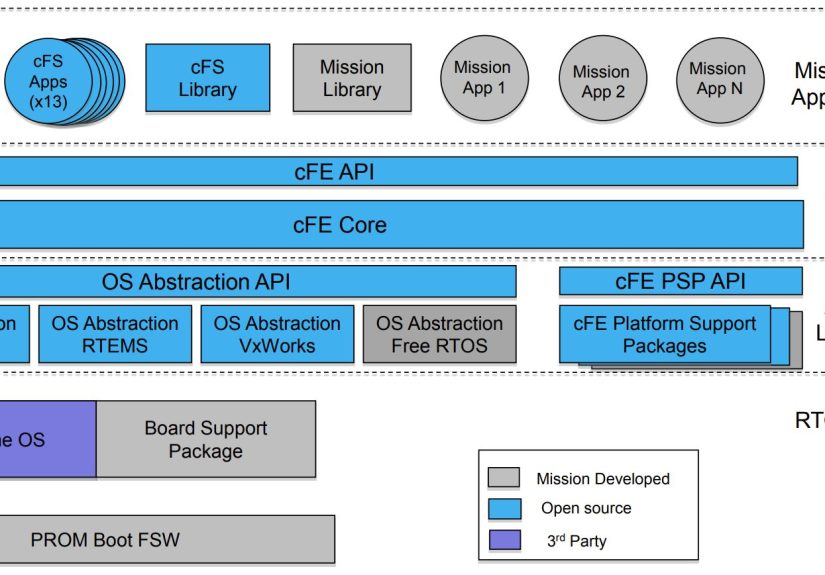
The Layer Cake: OSAL, PSP, cFE, Libraries, and Apps
OSAL: one API, many operating systems
The Operating System Abstraction Layer (OSAL) is how cFS stays portable. Instead of baking OS-specific calls into every app,
OSAL provides a consistent API for core OS services (tasks, queues, time, files, etc.). That means the same flight app logic can move between
environments with far less surgeryuseful when you’re developing on a desktop OS and flying on a real-time OS.
If you’ve ever tried to port embedded software by “just changing a few #defines,” you already know why OSAL exists. It’s the grown-up version
of that plan.
PSP: the hardware handshake
The Platform Support Package (PSP) is where the platform-specific glue lives: startup behavior, board-level interfaces, and the
hooks that connect the framework to a particular processor/board/RTOS combination. This is also where you handle platform realities like watchdog
behavior and low-level timing.
If OSAL is “how we talk to the OS,” PSP is “how we talk to the board.” Both are essential when you want your flight software to travel well.
cFE core services: the five “always invited” guests
cFE is commonly described as providing five core services that most flight applications depend on:
- Executive Services (ES): manages the flight software system and app runtime environment.
- Software Bus (SB): publish/subscribe messaging so apps can exchange commands and telemetry cleanly.
- Event Services (EVS): event messages for reporting, filtering, and logging system/app events.
- Table Services (TBL): runtime-configurable parameters via tablescrucial for tuning behavior without reflashing.
- Time Services (TIME): standardized time handling across apps.
Together, these services give you the foundation for modular flight software: apps can be loaded, managed, connected through messaging, configured,
and monitored in consistent ways.
The app ecosystem: where missions stop being abstract
Most of a mission’s “personality” lives in applications: attitude control, payload commanding, thermal management, autonomy rules, and more.
cFS supports a model where missions assemble a system from reusable apps plus mission-specific apps.
In the open-source cFS bundle you’ll see a mix of example “lab” applications (useful for learning and early integration) and more mission-oriented
apps that cover common spacecraft needs like health monitoring, scheduling, file management, telemetry, and stored commands.
Command & Telemetry in cFS: How the Spacecraft Talks (and Listens)
A cFS system is often easiest to understand by following the flow of information:
- Commands arrive from the ground system (or onboard autonomy).
- Commands are routed into the flight software via a command-ingest path.
- Apps subscribe to the command messages they care about via the Software Bus.
- Apps publish telemetry messages on the bus.
- A telemetry-output path packages and sends telemetry to the ground.
- Tables and events provide configuration and visibility as the system runs.
The publish/subscribe model is a big deal: it reduces tight coupling. Your thermal app doesn’t need to “know about” your payload app; it just
subscribes to the relevant telemetry and publishes its own. Integration becomes less like wiring a Christmas tree and more like connecting
Lego bricks that agree on the shape of the studs.
“Open Source” Isn’t a Test Plan: Flight Readiness and Verification
cFS lowers risk by giving you well-understood patterns and reusable components, but the mission still owns the safety case. In fact, the official
open-source bundle is explicit that it’s a starting point rather than an end product. Missions must perform verification and validation according
to their specific requirements, hardware, and operational constraints.
The smart way to think about it:
- cFS accelerates development by reducing “reinvent the wheel” work.
- cFS supports scalability from prototypes to complex missions through its layered architecture and app model.
- Flight assurance still applies: requirements, traceability, tests, fault management, and operational rehearsals remain on you.
In other words: cFS can help you build a better wheel faster, but you still need to test it before driving it on the Moon.
(Especially on the Moon.)
Real-World Adoption: From CubeSats to Commercial Moon Landers
cFS is used across a broad range of systemspublic, private, and research. Public descriptions include use on everything from CubeSats to flagship
missions, with NASA organizations highlighting extensive adoption across NASA projects. Recent NASA communications have also highlighted commercial
usage, including a private lunar landing mission that used cFS.
Why that matters: open source avionics frameworks only become “real” when they survive the full lifecycledevelopment, integration & test,
operations, and sustaining engineering. cFS was built with that lifecycle in mind, including support for long mission durations where on-orbit
software maintenance is part of the job description.
Getting Started With cFS (Without Summoning a Thousand-Page Build Error)
1) Start with an official bundle and run it on a friendly target
Many teams begin by building the open-source cFS bundle on a desktop environment to learn the services, message flows, and tooling. This is where
the “lab” apps shine: they help you compile, boot, send commands, and see telemetry quicklyso you can understand the architecture before you
customize it.
2) Move toward a mission tree mindset
Real missions typically use a “mission tree” approach: cFE + OSAL + PSP + selected flight apps + mission-specific apps + mission configuration.
That lets you keep upstream components up to date while controlling the mission-specific parts you own.
3) Add simulation and ground tooling early
If you want the fastest path from “it compiles” to “it behaves like a spacecraft,” pair cFS with a simulator and a ground command/telemetry tool.
One popular approach is OpenSatKit, which packages cFS with a ground interface and a dynamics simulator (including NASA’s “42”
simulator) so you can practice realistic operational flows on a desktop environment.
Simulation-first workflows are especially valuable for avionics because they expose timing, configuration, and interface assumptions earlywhen
changing them costs you coffee and a weekend, not a launch delay and a budget meeting.
Concrete Examples: What You Can Build With cFS Building Blocks
Example A: Table-driven payload configuration
Payload operations rarely stay static. Gains change, thresholds evolve, and operating modes multiply like rabbits. Table Services let you define
runtime-configurable parameters as tables you can load and validate. Instead of reflashing every time you tweak a threshold, you update a table
and keep the rest of the system stable.
Example B: Scheduling periodic work without chaos
Many avionics tasks are periodic: collect sensor data at 10 Hz, compute attitude at 1 Hz, publish housekeeping every 5 seconds, downlink a summary
every minute. A scheduler-style app pattern makes it easier to keep periodic work predictable and traceable, which is a fancy way to say:
“please don’t let the payload hog the CPU right when we need to catch a maneuver.”
Example C: File transfer using standardized protocols
Spacecraft often need to move files: stored science data, logs, configuration bundles, or new sequences. cFS has an implementation of
CFDP file transfer as a cFS app that plugs into the cFE environment and maps protocol data units through the software bus.
For missions that need reliable file delivery behavior, this provides a strong foundation.
Example D: Health monitoring and fault management
Nobody launches hoping to use fault protectionbut everyone launches needing it. A reusable framework helps normalize health monitoring patterns:
limit checking, watchdog behavior, event-driven reporting, and recovery actions. Even when your mission’s fault logic is unique, the scaffolding
around it benefits from consistency.
Design Patterns That Make cFS Systems Easier to Fly
- Message contracts over direct calls: publish telemetry; subscribe to what you need. Keep dependencies visible in message maps.
- Table-first configuration: treat tables as operational knobs. Add validation so bad tables don’t become bad days.
- Events as observability: use EVS intentionallytoo few events and ops is blind; too many and you DDoS your own logs.
- Graceful degradation: design apps to fail “small” when possibledrop to a safe mode, reduce rates, shed noncritical load.
- Path-to-flight discipline: prototype on desktop, then port through OSAL/PSP to the flight target while keeping app logic stable.
Common Pitfalls (A.K.A. “How We Learned to Stop Worrying and Love the Table CRC”)
Telemetry that looks fine… until you change one thing
If you’ve ever updated a message definition and suddenly everything downstream interprets a temperature as a quaternion, you’ve met the importance
of stable message interfaces. Treat message IDs, payload structures, and versioning with respect. Spacecraft are unforgiving, and so are parsers.
Timing assumptions that worked on Linux but not on the flight RTOS
Desktop development is greatuntil your flight target behaves differently under real-time constraints. The portability layers help, but you still
need to validate performance, scheduling, and resource usage on the real platform. This is where simulation and hardware-in-the-loop setups pay
for themselves.
“Open source” license surprises
cFS and related NASA repositories may use different licenses depending on the distribution and component. Some releases are under permissive
licenses, and some NASA software is released under NASA’s own agreement. Always check the license in the specific repository or distribution you
useespecially if you’re shipping commercial products or mixing codebases.
Conclusion: Why cFS Is a Big Deal for Open Source Spacecraft Avionics
NASA’s Core Flight System turns spacecraft avionics from a one-off craft project into something closer to an engineering discipline with reusable
components, standardized services, and an ecosystem that supports learning and flight use. Its layered design (OSAL + PSP + cFE + apps) makes it
portable across platforms, while the publish/subscribe messaging approach keeps systems modular and integrable.
If you’re building spacecraft flight software, cFS can help you get to a robust architecture faster, reduce duplicated work, and improve long-term
maintainability. Just remember the golden rule of avionics: reuse is a strategy; verification is a responsibility.
Field Notes: Experiences You’ll Have When You Actually Work With cFS (About )
The first “real” cFS experience most teams have is strangely emotional: you send a command, and telemetry comes back, and suddenly the system feels
alive. It’s like the spacecraft equivalent of hearing a car engine turn overexcept your engine is a distributed set of applications talking over a
software bus, and the “sound” is a stream of packets proving your message routing is not, in fact, haunted.
Week one often looks like this: you build the bundle, run it on a desktop, and try to understand where commands enter and where telemetry exits.
You’ll read a lot about Executive Services, the Software Bus, Event Services, and tablesthen you’ll realize the real learning happens when you
intentionally break something. Change a table value, reload it, and watch the behavior shift without a rebuild. That’s when “table-driven
configuration” stops being a bullet point and becomes a lifestyle.
Then comes the second rite of passage: you add a new application. At first it’s a humble app that publishes a counterbecause every flight software
journey begins with “hello, I can count.” Next you wire it into the scheduler, subscribe to a command, and emit an event when it runs. Suddenly,
you’ve created a small, testable unit that looks like the building block for real avionics logic. That modularity is addictive in the best way.
It encourages clean interfaces, because cFS makes it easy to connect components without turning the whole system into spaghetti.
The funny part is how quickly you become obsessed with observability. Event messages feel chatty at first, but during integration they’re gold:
a well-placed event can turn a mysterious “why didn’t it execute?” into a two-minute fix instead of a four-hour debug session fueled by cold pizza.
The trick you learn is moderationtoo many events and you drown; too few and you’re flying blind.
Porting is where the framework earns its paycheck. Moving from a desktop OS to a flight-like RTOS environment is never totally painless, but OSAL and
PSP turn it into a bounded problem instead of an archaeological dig through every application. The practical experience is that you stop rewriting
mission apps for every platform and start focusing platform-specific work where it belongs: in the abstraction layers and hardware interfaces.
Finally, you discover the operational mindset cFS encourages. Instead of assuming software is “done” at launch, you plan for sustaining
engineeringtuning tables, managing files, improving fault responses, and refining behavior over years. Working with cFS feels less like building a
one-time artifact and more like building a system you’ll live with, operate, and evolve. That’s a very spacecraft-specific kind of maturityand
it’s exactly what avionics needs.