Table of Contents >> Show >> Hide
- What a “smart lock” actually is
- How smart locks connect: Bluetooth, Wi-Fi, Z-Wave, Zigbee, Thread, and Matter
- Ways to unlock: choose your “main character” moment
- Security: smart locks aren’t automatically “more secure”but they can be safer in real life
- 1) Start with physical strength (because doors are still… physical)
- 2) Treat the app account like it’s the real key (because it kind of is)
- 3) Updates aren’t optional if you want “smart” without “sorry”
- 4) Your Wi-Fi router is part of your front-door security
- 5) Plan your “failure modes” like a responsible adult (even if you hate that)
- Installation realities: your door might be the boss here
- Battery life and maintenance: the unglamorous truth
- Who should consider a smart lock (and who might skip it)
- A no-regrets smart lock buying checklist
- Final thoughts: smart locks are convenience toolsmake them security tools too
- Real-World Experiences With Smart Locks (What People Actually Notice)
- 1) The “teenager test”: codes beat keys, but only if you manage them well
- 2) The “dog walker reality”: scheduling is the feature you didn’t know you wanted
- 3) The “battery wake-up call”: everyone learns this lesson once
- 4) The “short-term rental shift”: guest codes reduce chaos (and late-night calls)
- 5) The “ecosystem surprise”: the lock may be fine, but your platform matters
- 6) The “confidence factor”: the best smart lock is the one that matches your habits
Your front door has two jobs: keep strangers out and keep you from doing the “pockets–patdown–panic” routine
every time you leave the house. Smart locks promise to help with bothby letting you unlock with a code, your phone,
a fingerprint, or even a tap from your smartwatchwithout turning your entryway into a sci-fi movie set.
But smart locks aren’t magic (and they’re definitely not a force field). They’re a mix of physical hardware
(deadbolts, latches, strike plates) and digital features (apps, wireless connections, access codes, activity logs).
That combo can be awesomeor annoyingdepending on your door, your habits, and how you set things up.
What a “smart lock” actually is
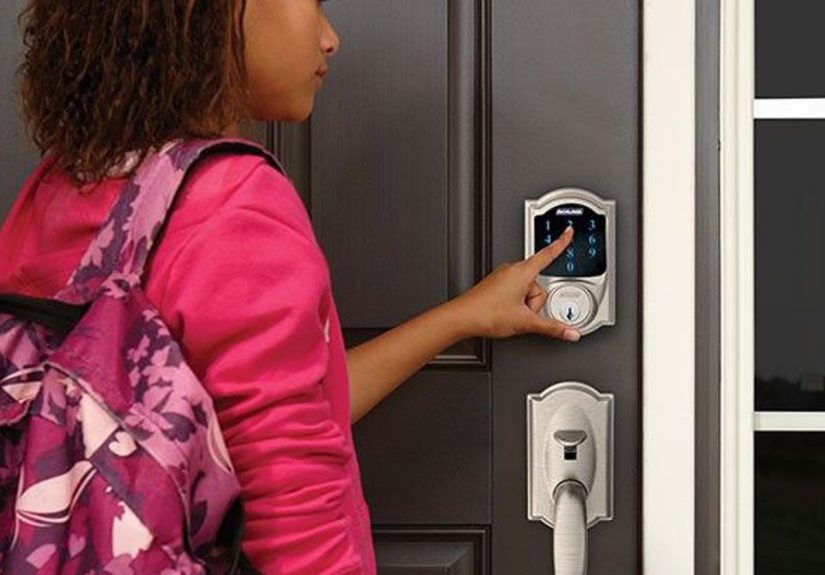
A smart lock is a door lock that can be controlled electronically, usually through a keypad and/or an app. Most models
still include a traditional keyway (a regular keyhole) as a backup, while others go fully keyless. The big idea is
flexible access: you can create codes for family, schedule a dog walker’s entry, or lock up from bed when you’re
already doing your “I’m comfy, don’t make me move” impression.
Two main styles: retrofit vs. full replacement
-
Retrofit smart locks replace the interior thumb-turn portion of an existing deadbolt, keeping your outside key
cylinder. They’re often renter-friendly and less visually obvious from the street. -
Full replacement smart deadbolts swap your whole deadbolt (inside and outside). They can look cleaner and may offer
more featureslike built-in keypads or better integration with smart home platformsbut installation is a bigger commitment.
Deadbolt vs. latch: why the bolt still matters
Many break-ins aren’t Hollywood-style hacking scenesthey’re blunt, physical attempts at forced entry. That’s why the
underlying lock type matters. A deadbolt generally provides better resistance than relying on a spring latch alone.
Consumer testing organizations evaluate locks for physical strength (think: impact and prying resistance), and smart locks
still need to pass that “brawn” testnot just the “brains” test.
How smart locks connect: Bluetooth, Wi-Fi, Z-Wave, Zigbee, Thread, and Matter
The connection type affects everything: range, reliability, battery life, and how you control the lock when you’re away.
Here’s what the common options really mean in everyday terms.
Bluetooth: simple, local, battery-friendly
Bluetooth locks typically communicate with your phone when you’re nearby. That’s great for quick entry and generally easier
on batteries than Wi-Fi. The tradeoff: remote control (locking/unlocking while you’re not home) may require a separate hub/bridge
or an additional device on your network. If you mainly want keypad entry and occasional phone control while standing at the door,
Bluetooth can be plenty.
Wi-Fi: remote access without extra gear (usually)
Wi-Fi smart locks connect to your home network, which can enable remote locking/unlocking and real-time notifications from anywhere.
That convenience comes with two common “gotchas”:
- Battery life can be shorter than Bluetooth or mesh-based options because Wi-Fi is power-hungry.
- Reliability depends on your network. If your router is flaky, your lock may be… moody.
Z-Wave and Zigbee: hub-based, smart-home-friendly, often reliable
Z-Wave and Zigbee locks typically talk to a smart home hub rather than directly to your phone over Wi-Fi.
These protocols are popular for whole-home automation because they can form a mesh network (devices relaying signals for each other).
Z-Wave operates in a U.S. frequency band that’s separate from Wi-Fi’s crowded 2.4 GHz space, which can help reduce interference.
Thread and Matter: the “new wave” (with a learning curve)
Thread is a low-power, IP-based mesh network designed for smart home devices. Matter is a connectivity standard meant to improve
interoperability across major platforms (think Apple Home, Google Home, Amazon Alexa, and others).
In practice, smart locks using Matter-over-Thread can offer strong local control and solid battery efficiencybut
you’ll usually need a Thread border router (a compatible always-on device, like certain smart speakers, hubs, or routers)
to connect Thread devices to the rest of your home network.
One more nuance: features can vary by platform. Some locks are “Matter compatible,” but the richness of features (like advanced automations,
special sensors, or detailed logs) may depend on the ecosystem you use and how far Matter support has matured there.
Ways to unlock: choose your “main character” moment
Smart locks shine because they’re not one-trick ponies. The best setup is the one that fits how you actually live.
(If you’re not going to use fingerprint unlock, don’t pay extra just because it sounds cool.)
Keypad codes: the crowd favorite
Keypads are popular because they work even when your phone is dead, lost, or doing that fun thing where it updates at the worst time.
Look for features like:
- Unique codes per person (so you’re not sharing one code with everyone like it’s the Netflix password).
- Scheduled or temporary codes for guests, service workers, or short-term rentals.
- Anti-peek / PIN masking options that let you add extra digits before/after the real code.
Phone control: great for “did I lock the door?” reassurance
App control is ideal for remote locking/unlocking and checking status. Many locks also offer:
auto-lock timers (lock after 30 seconds) and activity history (who unlocked and when).
If you’re buying for peace of mindkids arriving home, caregivers coming by, or deliveriesthose logs can be genuinely useful.
Fingerprint and other biometrics: fast, convenient, but not for everyone
Fingerprint sensors can be ridiculously convenientespecially when your hands are full. But real-life performance depends on
sensor quality, finger placement, and sometimes even weather (cold, dry skin can be less cooperative). If you choose biometrics,
keep at least one other method enabled (like keypad or key backup) so you’re not locked out by a stubborn thumb.
Tap-to-unlock and digital keys: Apple Home Key and beyond
Some locks support “tap” entryhold an iPhone or Apple Watch near the lock and it opens, like a transit card for your house.
This can be amazing for households because it feels natural: no app launching, no code memorizing.
The catch is compatibility and requirements. Depending on the platform, you may need a home hub device for certain features
(and for sharing access smoothly across the household). If Home Key is a must-have, confirm your exact lock model and ecosystem setup
before you buy.
Security: smart locks aren’t automatically “more secure”but they can be safer in real life
Let’s address the elephant in the foyer: “Can smart locks be hacked?”
Any connected device can be attacked. The better question is whether your smart lock is secure enough for your risk level,
and whether you set it up in a way that avoids the common mistakes.
1) Start with physical strength (because doors are still… physical)
Pay attention to hardware quality and security grading. Many residential locks are evaluated using industry standards that define
performance tiers (often referred to as Grades, with Grade 1 typically the highest performance level).
Practical takeaway: a smart lock with a weak deadbolt is like installing a high-tech seatbelt in a car made of papier-mâché.
Choose a lock built to take everyday abuseand consider reinforcing the door frame and strike plate if your door setup is flimsy.
2) Treat the app account like it’s the real key (because it kind of is)
The simplest security wins are still the most powerful:
- Use strong, unique passwords for your lock account.
- Enable two-factor authentication (2FA) if the manufacturer offers it.
- Don’t reuse codes. Give each person their own PIN and delete it when they no longer need access.
3) Updates aren’t optional if you want “smart” without “sorry”
Smart locks are small computers on your door. Like any computer, they benefit from security updates.
Pick a brand with a decent track record of maintaining its app and firmwareand actually install those updates.
If automatic updates are available and you trust the vendor, they can reduce the “I’ll do it later” trap.
4) Your Wi-Fi router is part of your front-door security
If your lock uses Wi-Fi (or relies on a hub that sits on your Wi-Fi), your home network becomes part of your security perimeter.
Basic home-network hygiene helps:
- Use WPA2/WPA3 security and a strong Wi-Fi password.
- Change the router admin password (not just the Wi-Fi password).
- Keep router firmware up to date.
- Consider a separate network for smart home devices if your router supports it.
5) Plan your “failure modes” like a responsible adult (even if you hate that)
Good smart lock setups assume something will go wrong eventuallybattery, Wi-Fi, app login, phone loss, you name it.
You want multiple ways to get in:
- Physical key backup (if included) stored somewhere sensible.
- Keypad entry as a fallback even if you normally use your phone.
- Emergency power option on some models (for example, temporary external power through a port).
Installation realities: your door might be the boss here
Most smart locks are DIY-installable with a screwdriver, but “easy” depends on your door.
Expect the smoothest install if your current deadbolt is standard and your door is properly aligned.
Common fit and function checks
- Door thickness and backset: most locks fit common U.S. standards, but older doors can surprise you.
- Deadbolt alignment: if the bolt scrapes the strike plate, the motor works harder and batteries drain faster.
- Weather exposure: if your lock is fully exposed to rain/sun, check for outdoor ratings and durability notes.
If you’ve got a sticky door that swells in summer or drags in winter, fix that first. Smart locks like smooth, consistent alignment.
Think of them as tiny gym-goers: they’re fine with resistance, but not thrilled about grinding metal every single day.
Battery life and maintenance: the unglamorous truth
Most smart locks run on AA batteries. Battery life varies by connection type (Wi-Fi often drains faster) and by how frequently the lock is used.
Many locks give low-battery warnings well before failureif you have notifications enabled and you pay attention to them.
Tips that save headaches
- Use the recommended battery type from the manufacturer.
- Turn on notifications for low battery and jam alerts.
- Keep the bolt aligned so the motor doesn’t strain.
- Test your backup entry method (key or code) before you actually need it.
Who should consider a smart lock (and who might skip it)
Smart locks are great for:
- Families who want kids to get in without carrying keys (and want alerts when they arrive).
- Hosts who need guest codes for rentals or frequent visitors.
- Caregiving situations where you want time-limited access for helpers.
- Forgetful mortals who regularly wonder if they locked the door.
You might skip (or simplify) if:
- You want zero dependence on apps, accounts, or wireless connections.
- Your door hardware is unusual and you don’t want to modify it.
- You’re not willing to do basic setup steps like updates and strong passwords.
A no-regrets smart lock buying checklist
- Pick your preferred entry method: keypad, phone, fingerprint, tap-to-unlock, or a mix.
- Decide on remote access: if you need it, confirm Wi-Fi or hub requirements.
- Match your smart home ecosystem: Apple Home, Google Home, Alexa, SmartThingsverify compatibility.
- Consider Matter/Thread if future-proofing matters, but confirm you have (or will add) a Thread border router.
- Check physical quality: look for reputable grading, strong build, and solid reviews for durability.
- Confirm backup access: key override, keypad, and/or emergency power options.
- Look at code management: unique user codes, schedules, one-time codes, and easy deletion.
- Think about privacy: what data is stored, where it’s stored, and what you can control in settings.
Final thoughts: smart locks are convenience toolsmake them security tools too
A smart lock can be one of the most practical upgrades you makeespecially if you’re juggling family schedules, visitors,
or a short-term rental. The best outcome comes from pairing solid hardware with smart setup:
strong passwords, 2FA, updates, and a plan for battery day.
Get those basics right, and you’ll spend less time playing “Where are my keys?” and more time enjoying the small luxury of
walking up to your door like you absolutely have your life together.
Real-World Experiences With Smart Locks (What People Actually Notice)
The first week with a smart lock is usually pure novelty. You’ll unlock the door with a code, then immediately lock it again
just to prove you can. You’ll give someone a temporary passcode and feel like a responsible wizard. Then real life happensand
that’s where smart locks either become your favorite home upgrade or your most dramatic piece of hardware.
1) The “teenager test”: codes beat keys, but only if you manage them well
Families often love smart locks because kids don’t have to carry keys (or lose them in a backpack black hole).
The real win isn’t just keyless entryit’s individual codes. When each person has their own PIN, you can change
access without changing locks. If a code gets shared with a friend “just this once,” you can remove it without disrupting the whole house.
It’s the difference between “Oops” and “Oops, now we’re rekeying the door.”
2) The “dog walker reality”: scheduling is the feature you didn’t know you wanted
A lot of people buy smart locks for remote unlocking and then discover scheduling is the secret hero. A code that only works
on Tuesdays between 1–3 p.m. is quietly brilliant. You don’t have to hide a spare key under a rock (which is basically a sign that says,
“Hello, burglars, please check here”). You also avoid the awkward moment of someone showing up early, letting themselves in, and
startling you while you’re in peak “at-home goblin mode.”
3) The “battery wake-up call”: everyone learns this lesson once
Nearly every long-term smart lock user has a battery story. Not always a disasteroften just a moment of confusion when the lock
beeps in an offended tone. The good news is most locks warn you well in advance. The bad news is humans are talented at ignoring
warnings until they become problems. The practical habit that helps: change batteries on a schedule (like smoke detector batteries),
and keep your backup method tested. If your lock has a key override, make sure you know where that key is. If it has a keypad, keep
at least one code memorized that isn’t stored only in your phone notes labeled “DOOR CODE DEFINITELY NOT IMPORTANT.”
4) The “short-term rental shift”: guest codes reduce chaos (and late-night calls)
Hosts often describe smart locks as a stress-reduction tool. Instead of coordinating key handoffs or hiding lockboxes, they create a
unique code per guest and set it to activate during check-in and expire after checkout. That change alone can cut down on awkward arrivals,
lost keys, and “We’re standing outside, help” messages. It also creates an audit trailuseful when you’re troubleshooting questions like
“Did housekeeping get in?” or “Did the guest actually lock the door?”
5) The “ecosystem surprise”: the lock may be fine, but your platform matters
One of the most common “huh” moments is realizing that your lock’s features can feel different depending on whether you control it through
the manufacturer app or a smart home platform. For example, you might love the native app’s detailed logs and code management, but prefer
the convenience of voice assistants or tap-to-unlock inside your broader smart home. People who are happiest long-term usually pick a lock
that works well both ways: a strong standalone experience plus the integrations they actually use.
6) The “confidence factor”: the best smart lock is the one that matches your habits
Some people want a lock that’s basically a keypad deadbolt with occasional phone control. Others want full automation: auto-locking,
notifications, routines, digital keys, and remote management. The best experiences happen when you buy for your real habitsnot your
“future highly organized self.” If you know you won’t maintain a complicated setup, choose a simpler lock with excellent hardware and
straightforward features. If you love smart home tinkering, pick a lock with robust integrations and flexible access controls.
Bottom line: smart locks are a daily-use device. When they fit your routine, they feel effortlesslike your house is quietly helping you.
When they don’t, they become one more thing to troubleshoot at the exact moment you’re carrying groceries in the rain. Choose wisely,
set it up thoughtfully, and you’ll land on the effortless side of that line.